
Household paperwork is easier to manage when every sheet has a next destination. The goal is not to build a perfect filing cabinet or keep every document forever. It is to give incoming paper a short path from arrival to action, reference storage, secure storage, temporary holding, or appropriate disposal.

A simple home paperwork organization system also separates decisions that are safe to make at home from decisions that depend on an issuing agency, tax rule, insurer, healthcare provider, school, warranty, property transaction, or legal matter. When the correct retention period or replacement process is uncertain, pause the disposal decision and check the current authority that governs that document.
Quick Overview of a Simple Household Paper System
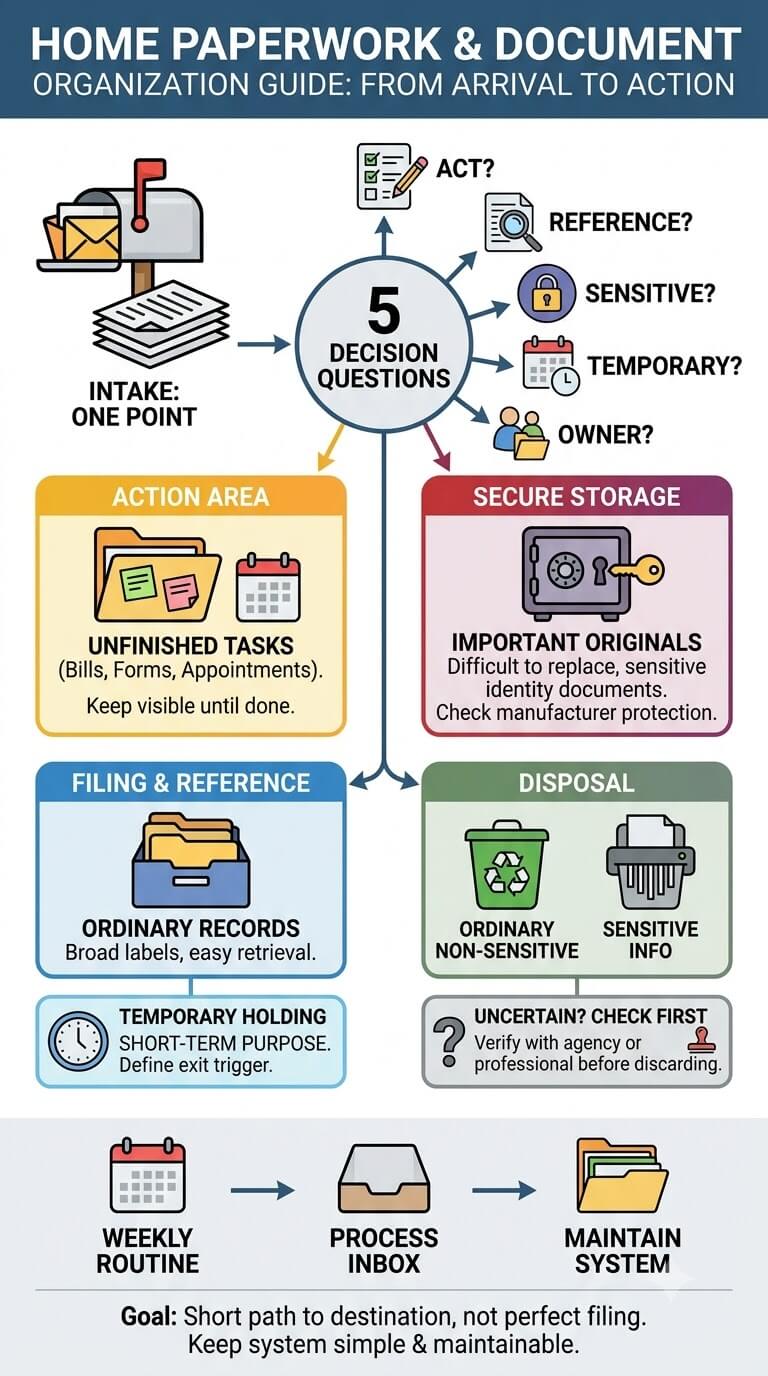
The five decisions every incoming paper needs
Route most household paper with five questions. Does someone need to act on it? Will it be needed later for reference or proof? Is it sensitive or difficult to replace? Is it temporary, and what event will end its purpose? Who owns it, and where would that person naturally look for it?
Those questions prevent a common mistake: putting paper away before deciding what it is for. A bill that still needs attention is not finished just because it is inside a folder. A receipt being held for a return should not automatically become a permanent record. A birth certificate should not disappear into an ordinary household folder simply because it fits there.
What this guide covers and what belongs elsewhere
This guide focuses on physical household documents: mail, forms, bills, records, receipts, school papers, medical papers, important originals, and the paper that accumulates between decisions. It covers the household workflow around those documents, not the substantive decisions behind them.
Tax questions belong with current tax guidance or a qualified tax professional. Legal documents may require advice from an attorney or instructions from the issuing court or agency. Medical documents should be interpreted by healthcare professionals, not by an organization system. Digital files, email, password storage, workspace layout, and business bookkeeping also need their own systems.
Why Household Paperwork Turns Into Clutter
Multiple intake points and delayed decisions
Paper enters through more places than the mailbox. Receipts arrive in wallets, permission slips in backpacks, appointment papers in bags, and notices on counters. When each entrance becomes a holding zone, several small piles form without anyone seeing them as one system.
You do not need to process every sheet immediately. Reduce temporary landing places instead. Paper can pause briefly near the door or in a bag, then move to one household intake point or directly to a known destination.
Mixing action papers with records
Finished records and unfinished tasks look similar on paper, so folders can hide work that still needs attention. Forms awaiting signatures, renewal notices, appointment instructions, and bills should stay visible in a bounded action area until the required step is complete.
Once the action is finished, decide whether the resulting paper has a continuing purpose. Some documents move into reference files, some belong with a receipt or medical record, and some no longer need to remain in the active system.
Keeping paper because the retention rule is uncertain
Fear of discarding the wrong document can make every folder grow indefinitely, especially with tax, property, insurance, employment, healthcare, school, warranty, or legal records. Do not solve that uncertainty with one universal retention chart. Requirements can vary by document, situation, and jurisdiction.
For tax-related records, for example, the IRS publishes current recordkeeping information and different situations can have different requirements. Check the IRS guidance for the record and tax situation involved rather than applying one household rule to every tax paper.
The Physical Paper Lifecycle
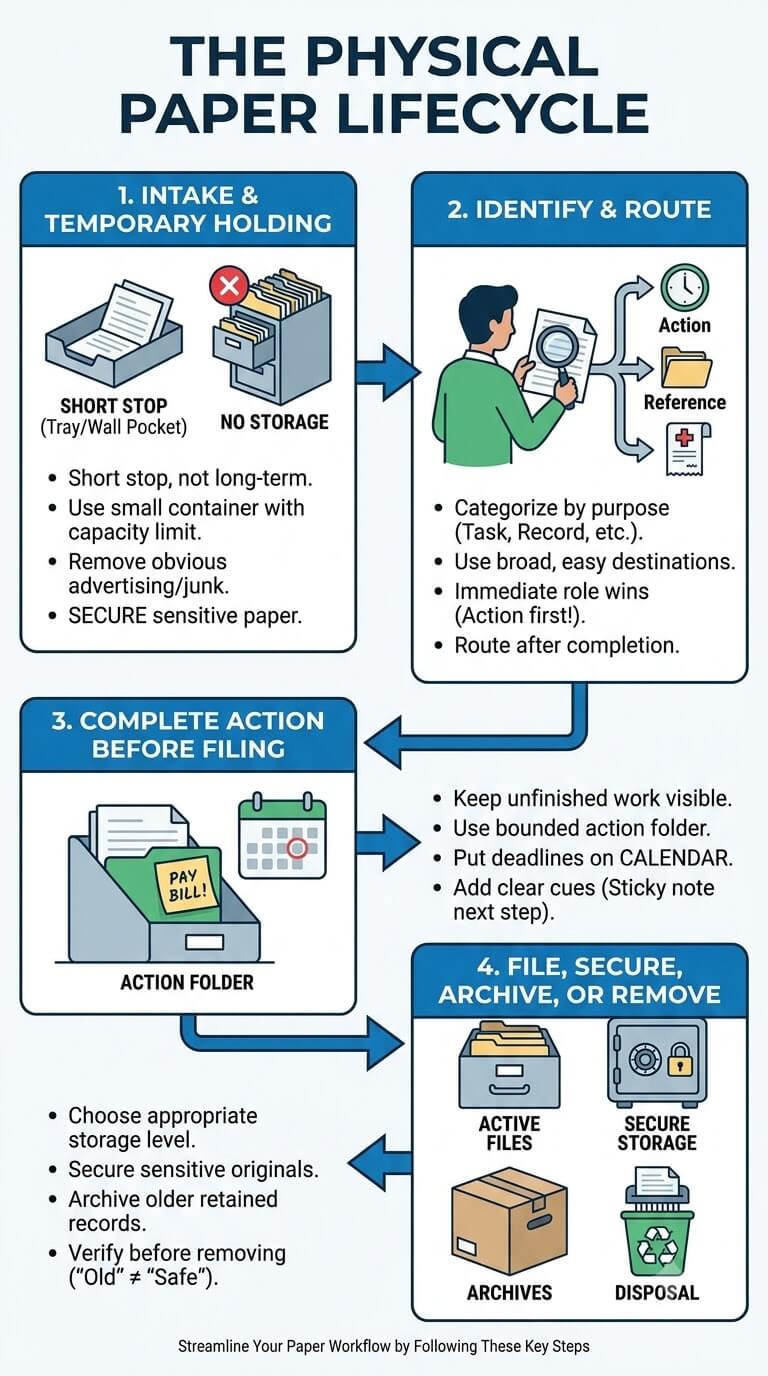
Intake and temporary holding
Intake is a short stop, not storage. A small tray, wall pocket, or folder can keep new paper from spreading until processing, provided it has a capacity limit and everyone knows what belongs there.
Obvious advertising or empty envelopes can be removed during quick intake when no further review is needed. Anything that requires thought should remain intact until it is processed. Sensitive paper should not be left exposed in an entryway or another openly accessible area.
Identify and route
Identify paper by purpose: unfinished task, retained reference record, important original, receipt, medical record, school paper, or an item needing research. Broad destinations are easier to maintain than dozens of narrow categories.
If a paper has two roles, let the immediate role win. A school form needing a signature or a medical bill needing payment is first an action paper. After completion, move it to the record category that fits any continuing purpose.
Complete action before filing
Keep unfinished work outside long-term files so it stays visible. A bounded action folder can hold items awaiting payment, signature, call, return, appointment, or another person. Put date-specific tasks on the household calendar too; paper alone is a weak deadline reminder.
A good test is simple: if you opened the folder tomorrow, would you know what must happen next? If not, the action needs a clearer cue, such as a sticky note with the next step, a calendar entry, or a separate pending-response folder.
File, secure, archive, or remove when appropriate
After action and review, choose the right storage level. Ordinary records may stay in active files, older retained records may move to archives, and sensitive or difficult-to-replace originals may need more secure storage. Paper with no remaining purpose can leave through an appropriate disposal method.
Before removing a document whose requirement is uncertain, check the issuing organization or other current authority. “Old” is not the same as “safe to discard.”
Decision Tree: Where Should This Paper Go?
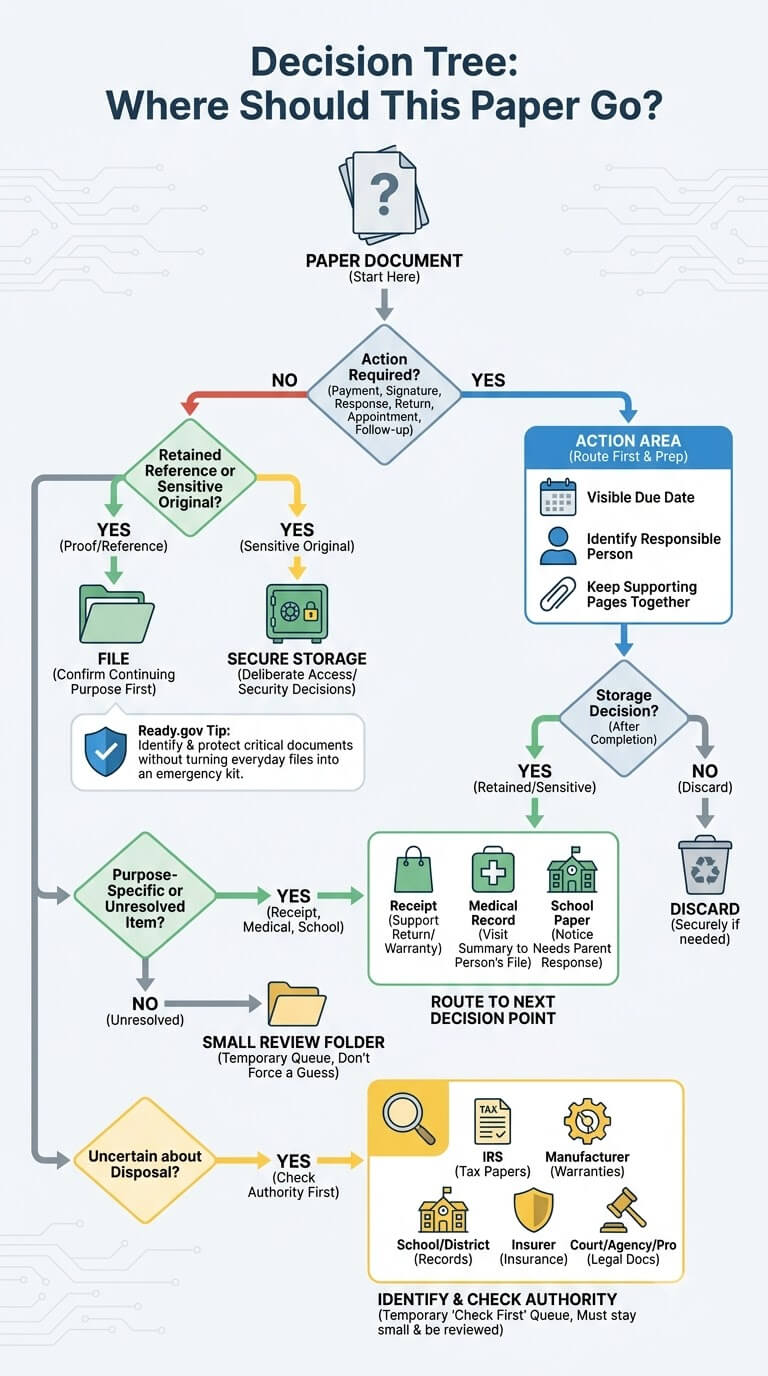
Does it require a payment, signature, response, return, appointment, or follow-up?
If yes, route it to the action area first. Keep supporting pages together, make any due date visible, and identify who is responsible. After completion, decide whether the paper still needs storage.
Is it a retained reference record or a sensitive important original?
If the paper is proof or reference, file it only after confirming a continuing purpose. Highly sensitive identity information or difficult-to-replace originals may need separate storage with deliberate access and security decisions.
Ready.gov recommends identifying and protecting critical household documents as part of financial preparedness. Its financial preparedness guidance can help households recognize documents that may deserve special attention without turning everyday files into an emergency kit.
Is it a receipt, medical record, school paper, or unresolved item?
Purpose-specific paper should go where its next decision can be made. A receipt may support a return or warranty, a visit summary may belong with one person’s medical records, and a school notice may need a parent response. Keep genuinely unresolved items in a small review folder rather than forcing a guess.
Which authority should be checked before uncertain disposal?
Use the paper to identify the right authority. Tax papers may require IRS guidance, warranties may depend on manufacturer terms, school records on school or district instructions, insurance papers on the insurer, and legal documents on the issuing court, agency, or qualified professional.
Create an “uncertain, check first” folder only if it stays small and is reviewed. It should be a temporary research queue, not a permanent home for difficult decisions.
Temporary Versus Long-Term Paper
Active papers and short-term holding
Temporary paper is tied to an event, such as a form being returned, an appointment occurring, a reimbursement being completed, or another defined purpose ending. The key is knowing the exit trigger.
Keep these papers in a place designed for frequent review rather than deep storage. If a temporary folder is overflowing, check whether finished papers are being moved out or whether the household is using the folder as a substitute for making decisions.
Reference files and archive records
Reference files hold records you expect to retrieve during current household life. Archive storage holds retained papers that are still needed but not part of routine retrieval.
Archive does not mean “keep forever.” It means “not active, but still retained for a known reason.” Review the archive periodically as an organization routine, while checking current requirements before discarding anything governed by outside rules.
Why temporary papers should have an exit trigger
A temporary category without an end condition becomes permanent clutter. Write the trigger on the folder if necessary: “after response received,” “after return decision,” “after appointment,” or another concrete event. Avoid writing a date unless that date is based on the actual policy or requirement that applies to the document.
Household Paper Categories at a Glance
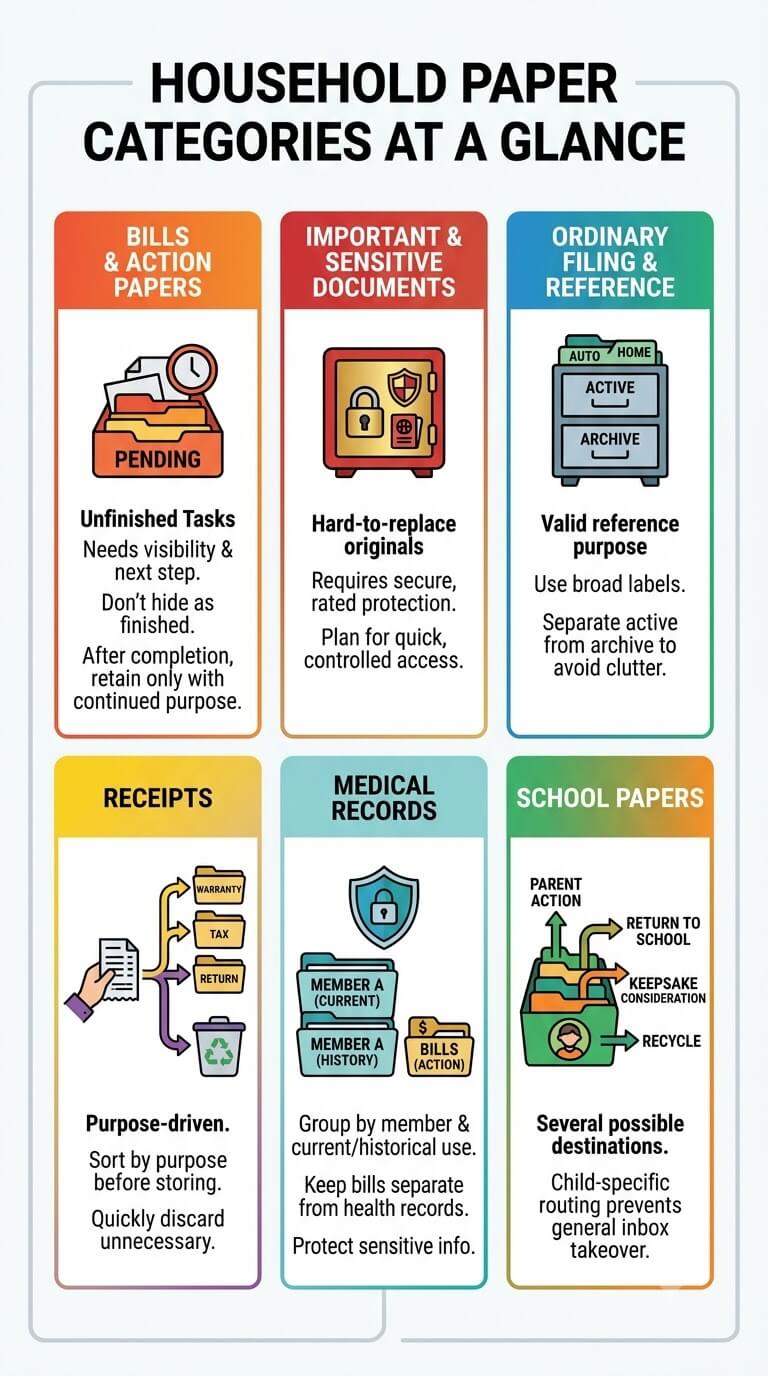
Bills and action papers
These are unfinished tasks. They need visibility, ownership, and a next step. Their storage should make action easier, not make the paper look finished. After completion, only retain what has a continuing purpose.
Ordinary filing and reference records
This category holds household records that have a valid reference purpose and do not require separate secure storage. Use broad, understandable labels and separate active material from archives so current files do not become packed with old records.
Important and sensitive documents
Identity documents, certain ownership records, and other difficult-to-replace originals deserve a different decision from ordinary filing. Consider who needs access, how quickly the document may need to be retrieved, and what manufacturer-rated protection a storage product actually provides.
Receipts
Receipts are purpose-driven. Some can leave quickly after you confirm they are unnecessary, while others may support a return, reimbursement, warranty, major purchase, medical record, property record, or tax matter. Sort by purpose before deciding whether a receipt deserves longer storage.
Medical records
Medical paper is easier to retrieve when grouped by household member and by current versus historical use. Keep bills requiring action separate from health records themselves. Protect documents that reveal health or insurance information from casual access.
School papers
School paper has several possible destinations: parent action, return to school, current reference, long-term record, keepsake consideration, or appropriate recycling. Child-specific routing prevents school paper from taking over the general household inbox.
Paper Inbox and Weekly Processing Rhythm
One intake point for mixed incoming paper
A paper inbox gives mail, receipts, notices, forms, and papers from bags one predictable temporary destination. Keep it small enough that buildup is visible; a container that can hide months of paper defeats the purpose.
The inbox can sit near the kitchen, family planning area, or another place where paper is naturally handled. Choose convenience without exposing sensitive contents to visitors or children.
Daily capture versus weekly decisions
Daily capture can be brief: remove obvious nonessential material, place papers that need thought into the inbox, and move urgent items to visible action when delay would be risky. Full sorting can happen during a recurring weekly session.
A weekly routine is an organization interval, not a legal or financial deadline. If a document has a due date sooner than the next routine, handle the deadline according to the document rather than waiting for the weekly session.
What should leave the inbox during processing
By the end of processing, papers should move to action, filing, secure storage, receipt handling, medical records, school handling, an outgoing location, or appropriate disposal. The inbox should return to empty or nearly empty. If the same items stay there week after week, the downstream destination probably needs clarification.
Filing Without Overbuilding the System
Active versus archive files
Keep frequently retrieved or currently relevant records easier to reach than older retained records. This prevents the active file area from becoming a history warehouse. When a file grows too large, check whether older material has a continuing reason to stay active.
Centralized versus distributed storage
One central location can work for shared records, but not every paper belongs there. Medical records may be grouped by person, important originals may need secure storage, and active tasks may stay near the household planning area. Keep destinations predictable without forcing incompatible documents into one cabinet.
Folder names a household can understand
Choose labels based on where someone would look, not on an elaborate classification scheme. “Home insurance” is usually clearer than a coded label. If two adults would independently choose different folders for the same paper, the categories may be too subtle.
When secure storage should be separate from ordinary files
Separate storage may be appropriate when sensitivity, replacement difficulty, or consequence of loss is higher than for ordinary records. Do not assume a cabinet provides protection it was not designed or tested to provide. Check manufacturer specifications for locks and rated protective features.
Shared Versus Individual Household Records
Assigning ownership
Every action paper needs an owner, and many personal records do too. Write a name on a temporary folder or use person-specific sections when several household members receive similar paperwork. Ownership prevents the “I thought you handled it” problem.
Family-wide files versus person-specific files
Housing, utilities, shared insurance, and household services often make sense as family-wide files. Medical, school, employment, education, and identity records are usually easier to retrieve when associated with the individual they concern. The exact mix depends on the household, but the distinction should be easy to explain.
Access without exposing sensitive information
Shared access does not mean leaving sensitive paper in open bins. Decide which adults need access, where the records are stored, and how someone would retrieve them if the usual record keeper were unavailable. The FTC advises keeping documents with personal or financial information in a safe place and disposing of them carefully when they are no longer needed; see its consumer guidance on protecting documents with personal information.
Sensitive Information and Disposal Boundaries
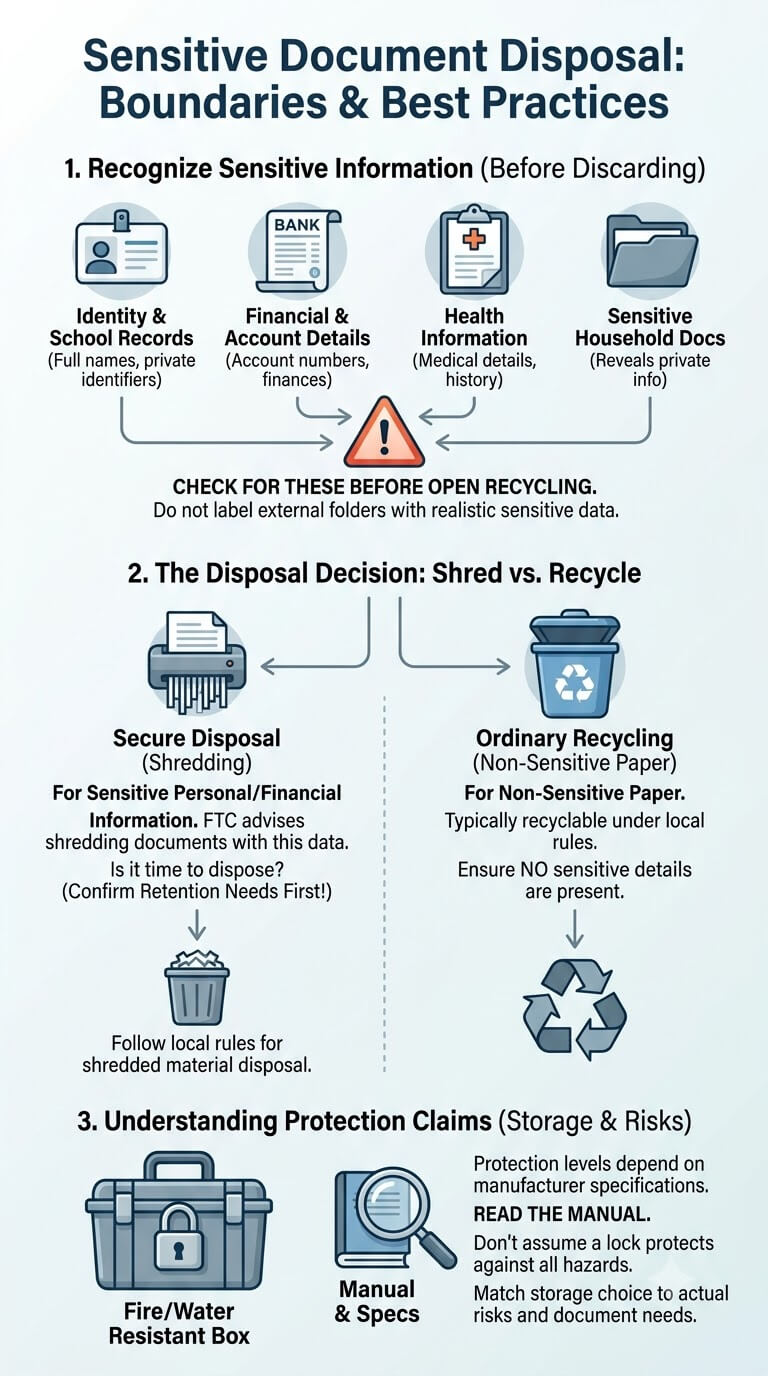
Recognizing identity, health, account, and school information
Before placing a paper in an open recycling bin, look for information that could expose a person’s identity, finances, health, account details, or private school records. Examples include full names paired with sensitive identifiers, account numbers, medical details, and documents that reveal more than the household intends to discard publicly.
Do not copy realistic sensitive identifiers onto labels or household index sheets. A folder can be specific enough to retrieve without displaying private numbers on the outside.
Shredding versus ordinary recycling is a decision, not a blanket rule
Ordinary non-sensitive paper may be recyclable under local rules, while paper with personal or financial information may need more secure disposal. The FTC advises shredding such documents when it is time to dispose of them; its document disposal guidance explains the distinction.
Shredding is a disposal method, not a retention decision. Confirm that the document no longer needs to be kept before destroying it, and follow local recycling or disposal rules for the shredded material.
Protection claims depend on manufacturer specifications
Labels such as fire-resistant or water-resistant should be tied to the tested or stated specifications of the actual container. Avoid assuming that a locked box protects against every hazard. When protection matters, read the product manual and rating details, then match the storage choice to the documents and risks you are trying to address.
Which Paperwork Problem Should You Solve Next?
Existing paper piles and backlog reset
If paper is spread across the home, begin with a bounded reset: gather it, remove only obvious non-record material, sort into broad destinations, and separate unfinished action. Do not start by designing permanent folders.
Permanent filing structure
If paper is sorted but retrieval is difficult, focus on folder categories, naming, active versus archive storage, and a simple index if needed. Filing should answer where retained ordinary records live, not whether every paper deserves retention.
Bills and action papers
If tasks disappear once paper is put away, keep unfinished business visible, assign responsibility, show dates clearly, and file records only after the required action is complete.
Important documents
If sensitive originals are mixed with ordinary folders, identify what is difficult to replace or costly to lose. Build an inventory and choose storage based on access needs, sensitivity, and verified product protection.
Receipts
If receipts fill wallets and drawers, sort them by purpose. Returns, warranties, reimbursements, major purchases, medical matters, property records, or tax needs may lead to different destinations. A receipt with no continuing purpose should not stay by default.
Medical records
If family health paperwork is mixed together, separate it by person and distinguish health records from bills or forms still needing action. Keep current appointment material easy to retrieve and protect private information.
School papers
If school paper covers the kitchen, separate parent action, return-to-school items, current material, long-term records, and keepsake candidates. The backpack carries paper home; it should not become permanent storage.
Paper inbox and weekly routine
If new piles return after every cleanup, add maintenance: one main intake point and a recurring processing session that sends paper onward. The inbox should prevent scattered piles, not become one.
Common Household Paperwork Organization Mistakes
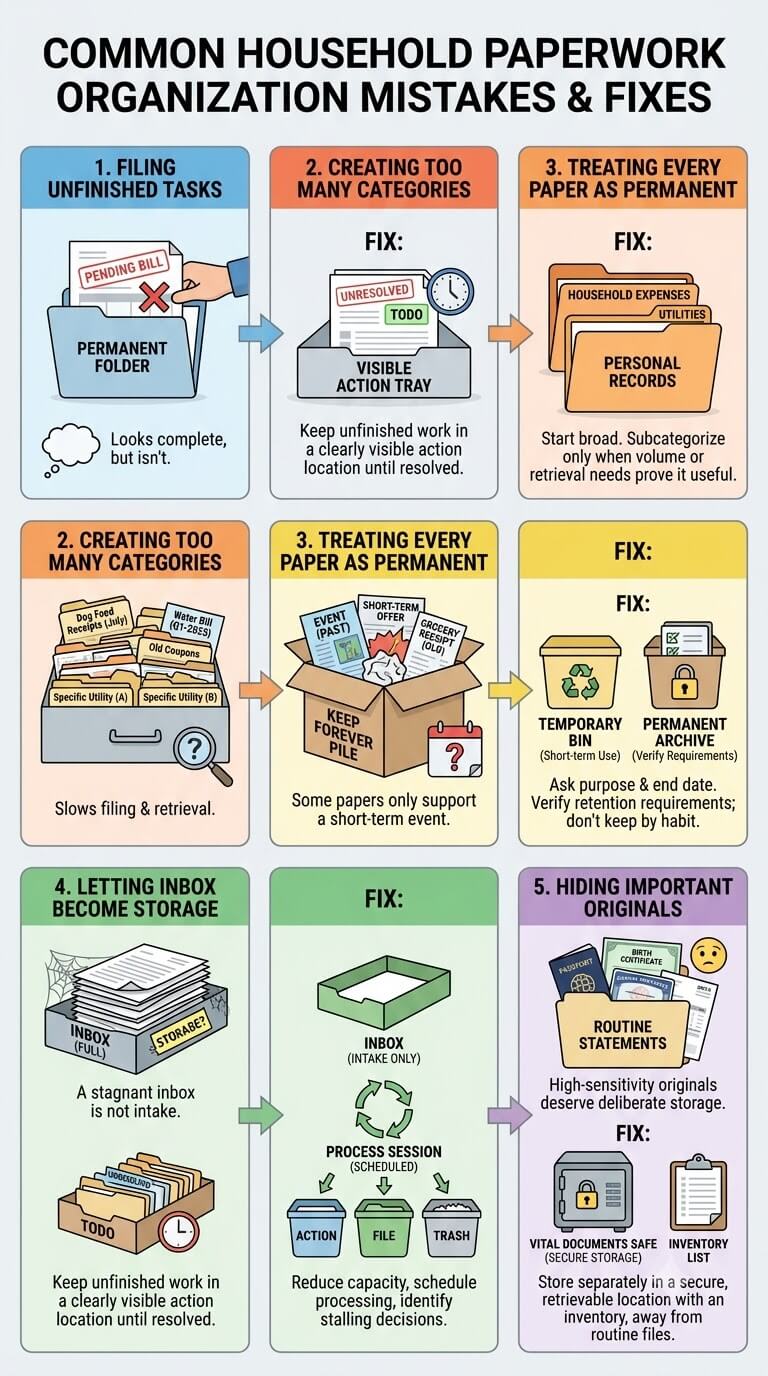
Filing unfinished tasks
Putting a bill, form, or notice into a permanent folder can make it look complete. Keep unfinished work in a clearly visible action location until the task is resolved.
Creating too many categories
Overly specific folders slow down both filing and retrieval. Start broad. Create a subcategory only when the volume or retrieval pattern proves that it is useful.
Treating every paper as permanent
Some papers exist only to support a short-term event. Ask what purpose the paper serves and what will end that purpose. If the retention decision depends on outside requirements, verify them rather than keeping or discarding by habit.
Letting the inbox become storage
An inbox that stays full is no longer intake. Reduce its capacity, schedule a recurring processing session, and identify which downstream decision is causing items to stall.
Hiding important originals inside ordinary folders
High-sensitivity or difficult-to-replace originals deserve deliberate storage and an inventory. They should be retrievable without forcing the household to search through routine statements and reference folders.
Signs the System Is Too Complicated
Household members cannot predict where papers belong
Ask another adult where they would put a new insurance notice, school form, or medical visit summary. If the answer depends on remembering a complicated rule, simplify the destinations. A household system should be teachable in a few minutes.
Multiple trays duplicate the same purpose
Several “to sort,” “later,” and “miscellaneous” containers usually create extra decisions without solving any. Give each temporary holder one distinct job and remove duplicates.
Retrieval takes longer than filing
If putting a paper away is easy but finding it later is hard, the labels may reflect how the record keeper thinks rather than how the household searches. Rename folders around retrieval questions and move active material closer to where it is used.
Simplifying labels and destinations
When the system feels heavy, reduce the number of places paper can go. A workable core is often enough: intake, action, ordinary files, secure documents, a few purpose-specific records, archive, and appropriate disposal. Add complexity only when a real retrieval problem requires it.
When Official Requirements or Professional Advice Are Needed
Tax, legal, insurance, healthcare, school, warranty, and property records
Organization can tell you where a document is and whether it is active or archived. It cannot decide every legal or contractual retention requirement. Check the agency, insurer, healthcare organization, school, manufacturer, employer, financial institution, or qualified professional responsible for the document when the requirement matters.
Missing or replacement documents
If an important original is missing, use the issuing authority’s current replacement process rather than relying on generic instructions. Keep notes about what has been requested and where the replacement will be stored when it arrives.
Separating organization decisions from substantive advice
A useful boundary is to ask, “Am I deciding where this paper belongs, or am I deciding what this document legally, financially, or medically means?” The first is usually an organization question. The second may require an official instruction or qualified professional.
FAQ About Home Paperwork Organization
Do I need one filing cabinet for the whole household?
No. One central location can simplify ordinary records, while sensitive originals, active tasks, and person-specific records may need different storage. Keep the destinations limited, predictable, and known to the people who need access.
Should every paper pass through a paper inbox?
No. The inbox is for brief holding before a decision. Obvious nonessential material can leave immediately, urgent action can go straight to the action area, and a known record can move directly to its established location.
How do I handle papers when I do not know whether I can discard them?
Keep it temporarily, identify who issued it and why it was retained, then check the current requirement. A small review folder is safer than guessing, but review it so uncertainty does not become permanent storage.
Can I keep optional digital backups without building a digital filing system?
Yes. A scan or photo can be an optional backup or convenience copy. Do not assume it replaces an original for legal, identity, property, travel, insurance, or other official purposes unless the responsible authority explicitly allows that substitution.
How often should I review active and archive files?
Use a schedule the household can maintain. An annual archive review can be a practical organization habit, but it is not a universal retention rule. Keep or remove specific records according to the requirements that actually apply.
Final Thoughts
A dependable household paper system depends on clear decisions. Give paper a short landing path, keep unfinished tasks visible, file records with a continuing purpose, separate sensitive originals when needed, and review temporary and archived paper before it becomes another backlog. When retention or replacement depends on an outside rule, stop and verify that rule before discarding anything. If every household member can explain where a new paper goes and what makes it leave, the system is simple enough to maintain.

Ethan Carter is the Founder & Editor of HomeCleanSecrets. Based in the United States, he has 5 years of experience creating practical home cleaning, laundry care, stain removal, decluttering, and home organization content. His goal is to help everyday households clean smarter and build simple routines that are easier to maintain.
Read more about Ethan Carter on his author page: https://homecleansecrets.com/ethan-carter/