
If paperwork is spread across counters, drawers, bags, boxes, and old folders, do not start by designing a filing cabinet. Start by making the backlog understandable. Gather it into one controlled project, sort by purpose, separate unfinished tasks, protect sensitive originals, and leave retained papers ready for a permanent home. If you need to see how intake, action papers, filing, secure storage, and periodic review work together, the broader household paperwork system gives you the full workflow.

This approach stays broad at first. You do not need to read every page or decide every uncertain document in one sitting. You only need enough information to know what the paper is for and what decision comes next.
Quick Answer: Reset the Backlog Before You Build the Permanent System
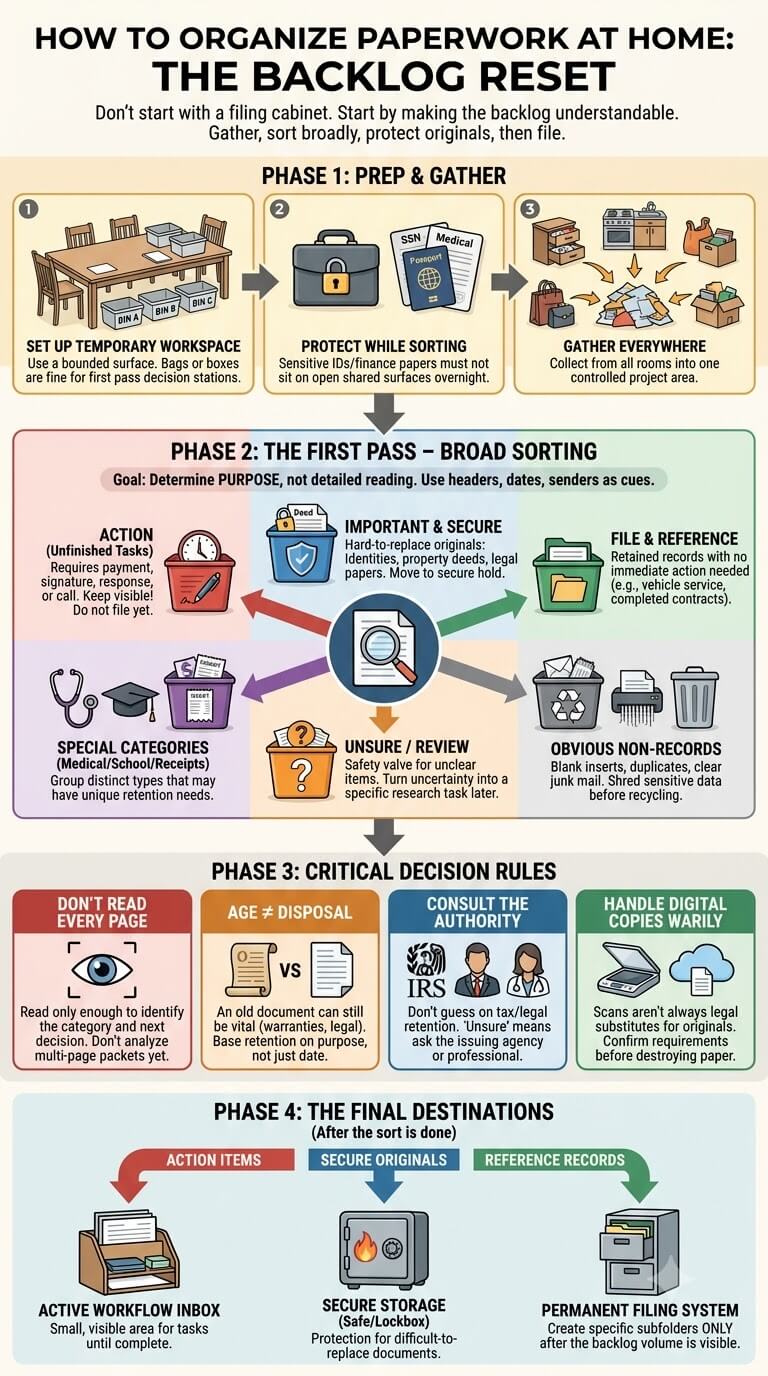
Gather, sort broadly, route unfinished tasks, protect sensitive originals, then hand retained records to filing
Work in this order: collect scattered paper, remove obvious non-records, sort the rest into a few temporary destinations, pull out unfinished tasks, protect sensitive originals, and isolate retention questions. Decide how permanent folders should be arranged only after the backlog is visible.
What this reset does not decide for you
A sorting session does not determine tax requirements, legal retention, medical necessity, warranty terms, school requirements, or whether a copy can replace an original. Those questions belong with the current issuing authority or appropriate professional. Keep uncertain papers contained until the correct decision can be made.
When to Use This Guide
Signs you have a backlog rather than an intake problem
You have a backlog when paper from different months or years is mixed together and you cannot tell what is current. Typical signs include multiple junk drawers containing documents, old bags of mail, an overfilled file cabinet, receipts mixed with statements, or piles that have moved from room to room without being processed.
When to process a small pile versus a multi-year accumulation
A small pile may fit into one bounded session. Split a multi-year accumulation into manageable containers or time blocks so it does not spread across the house. A good test is whether you can stop and leave every unprocessed sheet contained, protected, and separate from finished categories.
Set Up a Temporary Sorting Workspace

Choose a bounded surface and temporary containers
Use a dining table, folding table, cleared desk, or floor area that can hold several labeled containers without blocking household activity. Bags, boxes, folders, or bins are enough for the first pass. These are temporary decision stations, not the final filing system.
Utah State University Extension describes gathering, organizing, and storing household records as separate parts of a systematic process in its Household Information Records Organizer. That separation is useful during a backlog reset because it prevents storage decisions from slowing the initial sort.
Keep a stop point so the project can pause safely
Before opening the first box, decide where unfinished sorting will go if you need to stop. Use one lidded bin, one box, or one clearly marked stack. Do not leave half-sorted papers on the table overnight where they can mix with new mail, food, children’s papers, or household clutter.
Protect sensitive papers while sorting
Documents containing identity, account, health, or other private information should not sit on an open shared surface during a multi-day project. The FTC advises keeping documents with personal information in a safe place. Review its guidance on protecting documents with personal information before treating sensitive paper like ordinary recycling.
Gather Paperwork From Around the Home
Counters, drawers, bags, boxes, desks, and filing cabinets
Walk the home once with an empty box and collect paper from counters, drawers, bags, backpacks, desks, shelves, old boxes, and filing areas. If the filing cabinet contains unknown material, include it in the project rather than assuming everything inside is correctly placed.
Keep household-member groups visible when helpful
If several people’s records are mixed together, preserve obvious groups when that saves work, such as one child’s school packet or one adult’s medical envelope. Shared household records can remain together until their purpose is clearer.
Add unopened mail without turning the project into a mail-opening marathon
Old unopened mail belongs in the backlog, but opening every envelope before sorting can stall the project. Remove obvious advertising only when you are certain it is irrelevant. Group the rest and identify it in short groups, especially when an envelope could contain a bill, insurance notice, school form, medical information, or deadline.
First Pass: Remove Only the Obvious Non-Records
Blank inserts, duplicate copies, and clearly irrelevant material
The safest early wins are items that require almost no interpretation: blank envelopes, empty inserts, duplicate instruction sheets, outdated advertising, and exact extra copies you can confirm are redundant. Avoid making retention decisions based only on a quick glance at the date or thickness of the stack.
Sensitive information changes the disposal method
A paper can be unnecessary and still require careful disposal. Before placing anything in recycling or trash, look for names paired with account details, identification numbers, medical information, school information, signatures, or other sensitive data. The retention decision and the disposal method are separate decisions.
What to set aside when retention is uncertain
If you know what a document is but do not know whether you may discard it, move it to an “unsure” group instead of forcing an answer. This is especially important for tax, property, insurance, employment, healthcare, school, warranty, and legal papers. Uncertainty should create a research task, not a permanent paper pile.
First-Pass Sorting Categories

Action
Put papers here when something is still unfinished: payment, signature, response, phone call, appointment, return, reimbursement, renewal, or follow-up. The point is visibility. A document that still requires action should not disappear into a long-term record folder just because you already know its category.
File and reference
This group is for records you expect to keep and retrieve later, but that do not require immediate action or unusually secure handling. Examples might include current household records, vehicle service documentation, selected warranties, or completed correspondence. Do not create permanent subfolders yet.
Important and secure
Use this temporary group for identity documents, ownership papers, legal originals, and other difficult-to-replace or high-consequence documents. Keep the group physically protected during the reset. Later, these papers can be evaluated for appropriate secure storage instead of being buried in ordinary household files.
Receipts
Receipts deserve their own first-pass group because their value depends on purpose. They may support a return, warranty, reimbursement, tax matter, medical expense, home improvement, or major purchase. Do not assume every receipt belongs in permanent storage, and do not discard one until you know why it was kept.
Medical
Separate medical records by person when that is obvious, but keep bills and unfinished forms visible as action items. Visit summaries, immunization records, test reports, insurance paperwork, and medical receipts may eventually follow different routes. The first pass only needs to stop them from being mixed into unrelated household records.
School
School paper often mixes short-term notices, return-to-school forms, graded work, certificates, report cards, schedules, and official records. Make one temporary school group per child if needed. Parent-action forms should stay easy to see rather than sinking into a keepsake or reference stack.
Unsure and review
This category is a safety valve, not a dumping ground. Use it only when the next destination or retention decision is unclear. Note what needs checking, such as “confirm warranty requirement” or “ask school whether this is an official record,” so the next session begins with a specific question.
Sort Without Reading Every Page in Detail
Use purpose, sender, household member, and date cues
Most papers can be identified from the first page, envelope, header, sender, date, or household member’s name. Ask what the document is doing in your home: requesting action, proving something completed, supporting a purchase, recording health or school information, or serving as an important original?
Open enough to identify the decision, not to analyze the whole document
Long statements and multi-page packets can consume an entire sorting session if you read them line by line. Read enough to determine category and status. Keep multi-page sets together with clips or folders so supporting pages do not become detached while you continue sorting.
When a document does require closer review
Stop and read more carefully when a deadline, signature, payment, appeal, return, coverage change, property issue, or official instruction may be involved. Also stop if two similar-looking versions differ in dates or terms. In those cases, speed is less important than avoiding a mistaken action or disposal decision.
Separate Current Papers From Old Papers

Active tasks versus historical records
Current papers often need action, near-term reference, or placement in active household files. Historical papers may belong in archives, may be duplicates, or may no longer serve a purpose. Keep “old” and “finished” separate in your thinking because an old paper can still document something important, while a recent paper may already be unnecessary.
Papers spanning several years
When one category fills several years, first group by broad purpose and then place obviously older sets behind current material. Do not create a folder for every year unless the document type genuinely benefits from it. During a reset, fewer piles are easier to evaluate than dozens of year-by-year stacks.
Why age alone does not determine disposal
A date tells you when something happened, not whether the document still matters. Retention can depend on taxes, property ownership, insurance, warranties, legal matters, healthcare, employment, or other requirements. If the only reason you are discarding a paper is “this looks old,” pause and identify the underlying purpose first.
Move Action Papers Out of Archive Piles
Identify unpaid, unsigned, unanswered, return, appointment, and follow-up papers
As soon as you find unfinished business, move it to the action group. Look for due dates, signature lines, return instructions, appointment dates, response requests, renewal notices, and paperwork waiting on another household member. A good test is: if this paper vanished today, would a task also disappear?
Keep supporting pages together
An action item may depend on a return label, receipt, instruction page, claim number, appointment note, or envelope. Keep the full packet together until the task is complete. Separating the “important page” too early often creates a second search later when the supporting information is suddenly needed.
Route completed records only after the task is finished
Once the payment, signature, response, return, appointment, or follow-up is complete, decide what record remains useful. Some completed paperwork moves to ordinary filing, medical records, school records, receipt storage, or secure storage. Other papers can leave the active system after applicable requirements have been checked.
Route Sensitive and Important Documents
Recognize identity, ownership, legal, and difficult-to-replace originals
Birth certificates, passports, Social Security-related documents, vehicle titles, property documents, court papers, and similar originals deserve different handling from ordinary reference files. You do not need to decide their final storage location during the sorting session. You do need to stop them from circulating in open piles.
Use temporary secure holding during the reset
Choose a locked drawer, secure container, or other access-controlled place appropriate for your household while the project is underway. Keep a simple inventory note if papers are removed from the sorting area so you remember what was routed there. Avoid writing sensitive numbers on the inventory itself.
Avoid treating an ordinary filing drawer as automatic secure storage
A folder labeled “Important” does not provide physical protection by itself. After the reset, evaluate who needs access, how quickly the original must be retrieved, and what storage claims are actually supported by the product manufacturer. Do not assume a standard file cabinet provides rated protection against fire, water, or theft.
Use Temporary Folders Before Designing Permanent Files
Broad labels first
Temporary labels such as Housing, Vehicle, Insurance, Medical, School, Receipts, Action, Important, and Review are usually enough to reveal the shape of the backlog. Broad grouping helps you see which categories are tiny, which are overflowing, and which contain several different kinds of records that may need separate treatment later.
Why too many subcategories slow the reset
Creating labels for every company, child, account, year, appliance, and document type forces permanent decisions too early. If you spend more time making folders than moving paper, simplify. The goal is to reduce uncertainty and volume, not perfect the storage architecture.
What information to learn from the sorting pile before building a filing system
Notice how much paper each broad category produces, which records you retrieve often, which household members need their own sections, and which papers need secure storage rather than ordinary files. Those observations are more useful for designing permanent folders than copying a generic category list that may not match your household.
Process the Unsure Category Safely
Identify why you are unsure
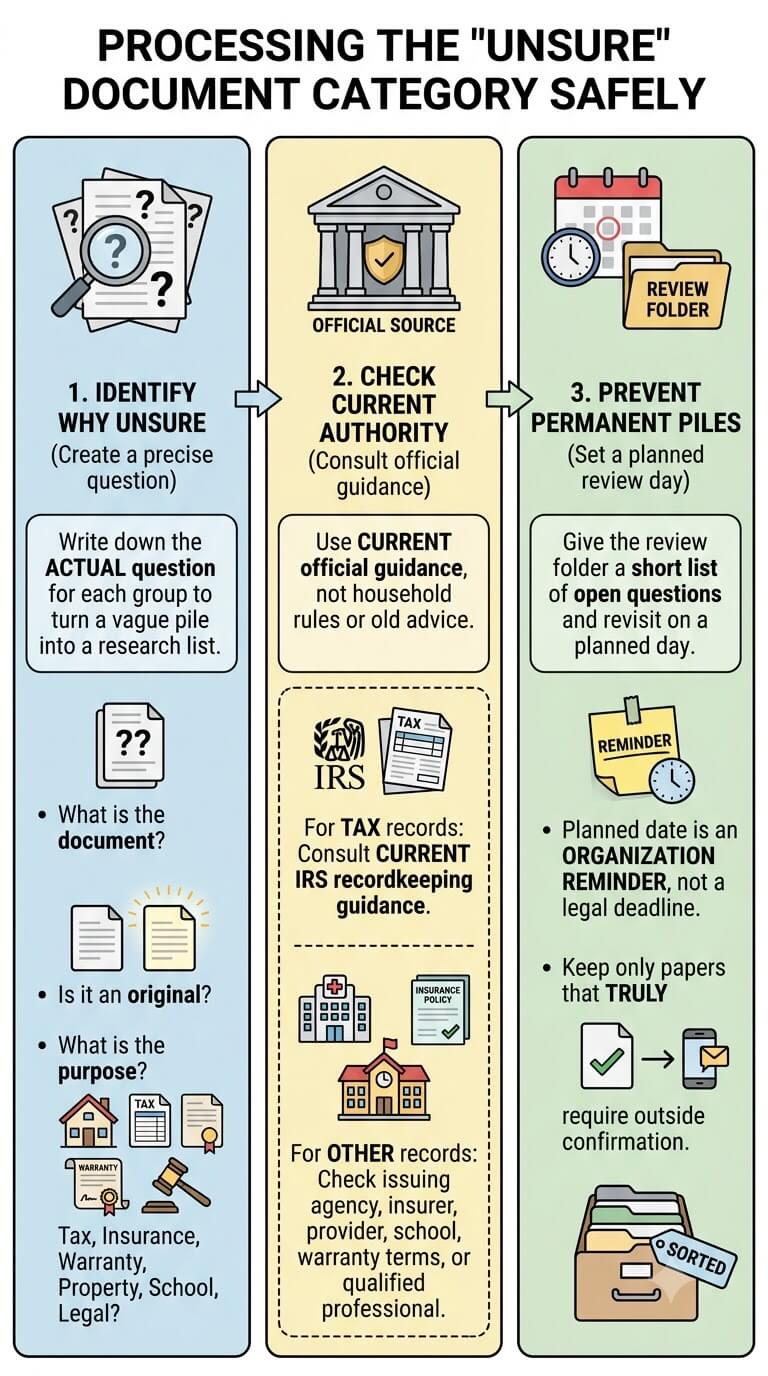
Write down the actual question for each uncertain group. Do you not know what the document is? Are you unsure whether it is an original? Does it support taxes, insurance, a warranty, property ownership, school requirements, or a legal matter? A precise question turns a vague pile into a short research list.
Check the current authority that governs the record
For tax-related documents, use current official guidance rather than a household rule of thumb. Consult the current IRS recordkeeping guidance when tax relevance is the reason you are hesitating. For other records, check the issuing agency, insurer, healthcare provider, school, warranty terms, or qualified professional as appropriate.
Prevent the unsure pile from becoming permanent storage
Give the review folder a short list of open questions and revisit it on a planned day. That date is an organization reminder, not a legal retention deadline. Keep only papers that truly require outside confirmation.
Reduce Duplicate and Redundant Paper
Exact duplicates versus different versions
Two papers that look alike are not always duplicates. Check dates, revision numbers, signatures, page counts, and account periods before removing one. Exact photocopies or repeated printouts are easier to reduce. Different versions of a contract, form, policy, or official record may have different significance.
Originals versus convenience copies
Mark convenience copies lightly if that helps prevent confusion, but do not alter originals that should remain intact. If you cannot tell which version is the original, keep the set together and verify with the issuing authority before discarding anything that may be difficult or costly to replace.
Digital copy boundaries and why a scan is not automatically a legal substitute
A photo or scan can be useful as a convenience backup or reference copy, but it does not automatically replace a physical original. The acceptable format can depend on the document and the organization that issued or requires it. Treat scanning as optional duplication, not permission to destroy the paper.
Reset Scattered Drawers and Paper Piles
Choose one main paperwork area
After sorting, pick one main place where household paper decisions happen, such as a cabinet, shelf, desk corner, or closet file box. You do not need a dedicated office. The important change is that paper no longer lives permanently in every room where it lands.
Create a temporary overflow limit
If the backlog cannot be finished at once, keep unprocessed paper inside one defined container. When the container is full, process from it before adding another box. An overflow limit prevents “temporary” storage from expanding into a second hidden archive.
Return rooms to non-paper functions without hiding unfinished sorting
Clear kitchen counters, dining tables, bedside surfaces, and entry areas only after unfinished paper has a labeled temporary home. Moving a pile into an unlabeled closet may make the room look better, but it does not reduce the decisions. The project is finished when the paper is routed, not merely out of sight.
Finish the Reset and Hand Papers to the Next System

Retained records move to permanent filing
Once the backlog is sorted, ordinary records can be placed into a simple permanent filing structure based on the categories your household actually uses. Keep the first version modest. If a category needs expansion later, you can add a subfolder after real retrieval needs prove it is useful.
Sensitive originals move to appropriate secure storage
Important documents should leave the temporary sorting zone and move to storage chosen for their sensitivity, replacement difficulty, and household access needs. Keep product protection claims tied to manufacturer specifications, and avoid placing sensitive originals in an openly accessible family paperwork area.
Action papers move to the active workflow
Unfinished bills, forms, returns, appointment papers, and follow-ups belong in a small active area where they can be reviewed until complete. Do not let the action folder become a second archive. When the task is finished, route any retained record to its proper category.
New incoming paper moves to the paper inbox routine
A backlog reset fixes accumulated paper, but it does not prevent new piles by itself. After the reset, use one bounded intake location for mail, receipts, school notices, forms, and other incoming paper, then process it on a predictable schedule so new material does not merge with the old backlog again.
Common Paper-Sorting Mistakes
Building a perfect taxonomy before sorting
A detailed folder plan feels productive, but it often delays the real decisions. Start with broad destinations and let the actual volume of retained records show you which permanent categories deserve their own folders.
Filing unfinished tasks
Putting a bill, form, or renewal notice into a reference folder can make the paperwork look organized while hiding the task. Pull anything that still requires action into a visible, limited-capacity workflow until it is complete.
Discarding by age alone
Old does not mean disposable. Identify the document’s purpose first, then check any tax, legal, insurance, medical, school, warranty, property, or other requirement that affects retention before making the disposal decision.
Making a giant miscellaneous folder
A large “miscellaneous” file recreates the original problem inside one folder. If an item is genuinely uncertain, label the reason it needs review. If it has a clear purpose, put it into the broad category that matches that purpose.
Starting multiple rooms at once
Gathering from the whole home is useful, but opening several sorting stations is not. Bring paper to one controlled workspace, or process one bounded container at a time. Stop if the project starts spreading into new rooms faster than you are completing decisions.
Edge Cases
What if the paperwork spans a decade or more?
Do not sort ten years page by page in chronological order. Start by separating broad purposes and obvious action items, then split oversized categories into manageable age bands only if needed. Research retention questions category by category instead of applying one discard date to the entire backlog.
What if several household members share the same documents?
Keep true household records together when everyone would expect to find them in the same place. Person-specific medical, school, identity, or employment papers can be separated by owner. For jointly owned property or insurance records, use one primary home rather than duplicate copies in multiple personal folders unless a valid reason requires duplicates.
What if you cannot tell whether a record is an original?
Compare paper quality, signatures, seals, stamps, issue markings, and copies you already have, but do not destroy a questionable version based on appearance alone. Keep the versions together and ask the issuing agency or relevant professional what form is recognized for the purpose you need.
What if the filing cabinet itself is part of the backlog?
Empty it in sections rather than dumping every drawer at once. Label the drawer or section you are working from so you can stop safely. Old folder names should not control the new sort; judge each retained paper by current purpose, action status, sensitivity, and retrieval need.
FAQ About Organizing Paperwork at Home
Should I sort by year or by category first?
For a mixed household backlog, category usually makes the first pass easier because it reveals what each paper is for. Add year groupings later only where they help retrieval or a document-specific requirement. Several years of paper become easier to handle once medical, school, receipts, action papers, and other records are separated.
What should I do with unopened mail inside an old paper pile?
Keep it separate and open it in short groups. Remove obvious advertising when you are certain it has no purpose, but check envelopes that could contain statements, bills, notices, forms, medical information, school information, or other time-sensitive material. Any unfinished task should move immediately to the action group.
How many temporary categories should I use?
Use the fewest categories that let you make confident next-step decisions. For many households, Action, File/Reference, Important/Secure, Receipts, Medical, School, and Unsure are enough for a first pass. Add a category only when a large volume of paper has a genuinely different destination.
Can I discard old papers just because I have a digital copy?
No general rule makes that safe for every document. A digital copy may be convenient, but whether it can replace paper depends on the record and the organization that requires it. Confirm the applicable requirement before discarding an original or a paper that may still be needed.
What do I do after the backlog is finally sorted?
Move retained reference records into a simple permanent filing system, place sensitive originals in appropriate secure storage, keep unfinished tasks in an active workflow, and start one bounded intake routine for new paper. Review the “unsure” folder until its questions are resolved instead of letting it become the next backlog.
Final Thoughts
A successful paperwork reset does not require perfect labels or one exhausting weekend. Gather the paper, identify its purpose, separate unfinished tasks, protect sensitive material, hold uncertain records for verification, reduce true duplicates, and route what remains. Once the old piles are understandable, permanent filing and weekly maintenance are much easier to build.

Ethan Carter is the Founder & Editor of HomeCleanSecrets. Based in the United States, he has 5 years of experience creating practical home cleaning, laundry care, stain removal, decluttering, and home organization content. His goal is to help everyday households clean smarter and build simple routines that are easier to maintain.
Read more about Ethan Carter on his author page: https://homecleansecrets.com/ethan-carter/