
New paper needs one reliable place to wait. Mail, receipts, school notices, and appointment forms can otherwise spread across counters, bags, and drawers. A paper inbox gives them one temporary landing place until a weekly routine sends each item to its real destination. The inbox is the intake stage of a complete household paper system, not the final destination for action papers or records.

The inbox is not storage. It is a short stage between paper entering the home and a clear decision, so action papers stay visible, records reach the right files, sensitive documents move to safer storage, and unnecessary paper can leave appropriately.
Quick Answer: One Temporary Inbox, One Weekly Processing Session, Clear Destinations
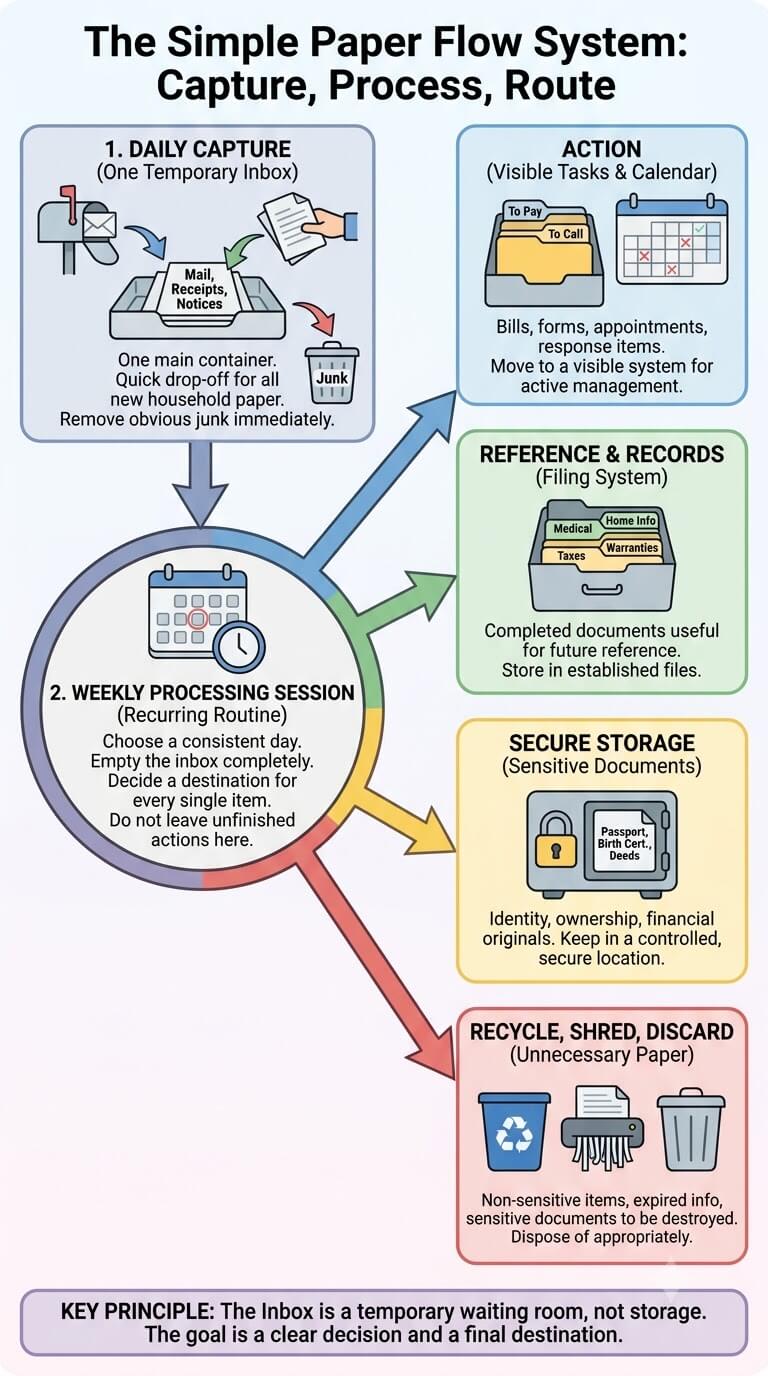
A workable setup can be very simple: choose one bounded container, capture incoming household paper there, and process it on a recurring day.
Capture first, decide during processing, then empty or nearly empty the inbox
During a busy weekday, capture can take seconds. Put the paper in the inbox instead of deciding whether it needs filing, a signature, a phone call, or secure storage.
The inbox is not a filing cabinet or action archive
A paper that has been identified as a record should move to its file. A bill, form, or notice that still needs action should move to the place where unfinished tasks are managed.
What a Paper Inbox Is
Think of the inbox as a waiting room for paper that has entered the household but has not yet been fully processed.
A temporary holding point for incoming household paper
The inbox can receive ordinary mail after quick junk removal, receipts brought home from errands, school notices, medical forms, appointment papers, household notices, and other physical documents that need a later decision. It should hold paper briefly, not become the final home for any category.
Difference between intake, action, filing, archive, and secure storage
Intake answers, “Where does this wait before I decide?” Action storage answers, “Where does this stay while I still have something to do?” Filing and archive storage hold records you intend to retrieve later. Secure storage is for sensitive or difficult-to-replace documents that should not sit in an openly accessible household queue.
What does not belong in the inbox
Do not use the inbox for old magazines, children’s craft supplies, office supplies, permanent records, completed tax files, or a growing stack of papers you already know you must act on. If an item already has a known destination, placing it back in intake only creates an extra step.
Where the Paper Inbox Fits in the Household Flow
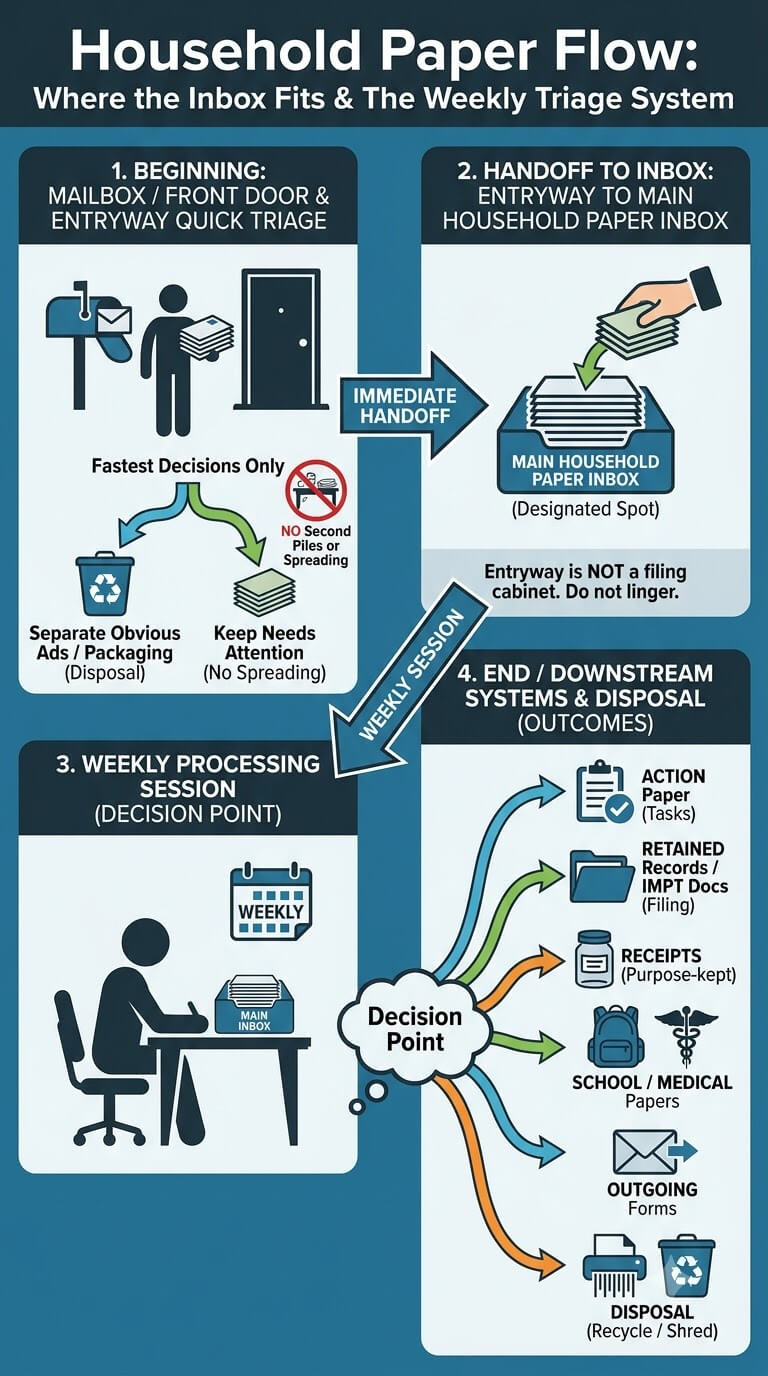
The best system has a clear beginning and end.
Mailbox or front door to entryway quick triage
At the door, do only the fastest decisions: separate obvious advertising or packaging, keep mail that needs household attention, and avoid letting envelopes spread across the entryway. If you use postal tools to manage incoming deliveries, the USPS mail-management resources can help with delivery-related tasks, but they do not replace the household processing step.
Entryway to household paper inbox
After the quick entryway pass, move retained paper to the main inbox instead of building a second mail pile near the door. This handoff matters because the entryway should not slowly become the family filing cabinet.
Inbox to weekly processing and downstream systems
The weekly session is the decision point. An item may become an action paper, a retained record, a receipt kept for a purpose, a school paper, a medical record, an important document, an outgoing form, or paper that can be disposed of appropriately.
Choose One Main Intake Location
Placement should make capture easy without turning the container into public display. Pick a spot household members naturally pass, where paper can be dropped quickly and processed comfortably once a week.
Kitchen, command area, or home-office-adjacent location
A small kitchen command area, a shelf near the family calendar, or a spot just outside a home office can work. The best location is not the most decorative one.
Accessibility for the household
Everyone who brings in paper should know where it goes. In a multi-person home, that may mean a clearly labeled tray or upright file that adults and older children can reach.
Keep sensitive papers out of openly exposed areas
An open basket in a busy kitchen is a poor temporary location for papers showing account details, medical information, identity information, or other sensitive data. If such documents arrive, move them promptly to a more controlled place while preserving whatever action or filing step is still required.
One Inbox or Multiple Inboxes?
Most households benefit from one main queue because every additional inbox creates another place that must be checked.
One household inbox as the default
Start with one container for incoming household paper. A single queue makes the weekly routine obvious and prevents each room from developing its own backlog.
When limited person-specific separation helps
A small divider for two adults, a caregiver, or older children can help when papers regularly require different people to review them. Keep the separation inside one main intake area when possible.
Avoid creating multiple hidden queues
Watch for “temporary” paper in drawers, tote bags, baskets, desk corners, and vehicle consoles. If these places are routinely holding unprocessed household documents, they are functioning as unofficial inboxes.
Set a Capacity Limit
A paper inbox needs a physical boundary. Capacity is useful feedback: when the container fills, something in the capture or processing rhythm needs attention.
Small enough to force processing
Choose a tray, slim file box, or upright holder that accommodates a normal week of paper without inviting months of accumulation. You should be able to see that the volume is increasing.
Avoid deep containers
Deep baskets hide older pages underneath newer ones. Papers that entered first can disappear at the bottom even when they have dates or actions attached.
What overflow is telling you
Overflow does not automatically mean you need a larger bin. It may mean the processing day is skipped, too much junk survives the first pass, completed action papers are returning to intake, or downstream files are so complicated that nobody wants to finish routing them.
Daily Quick Capture
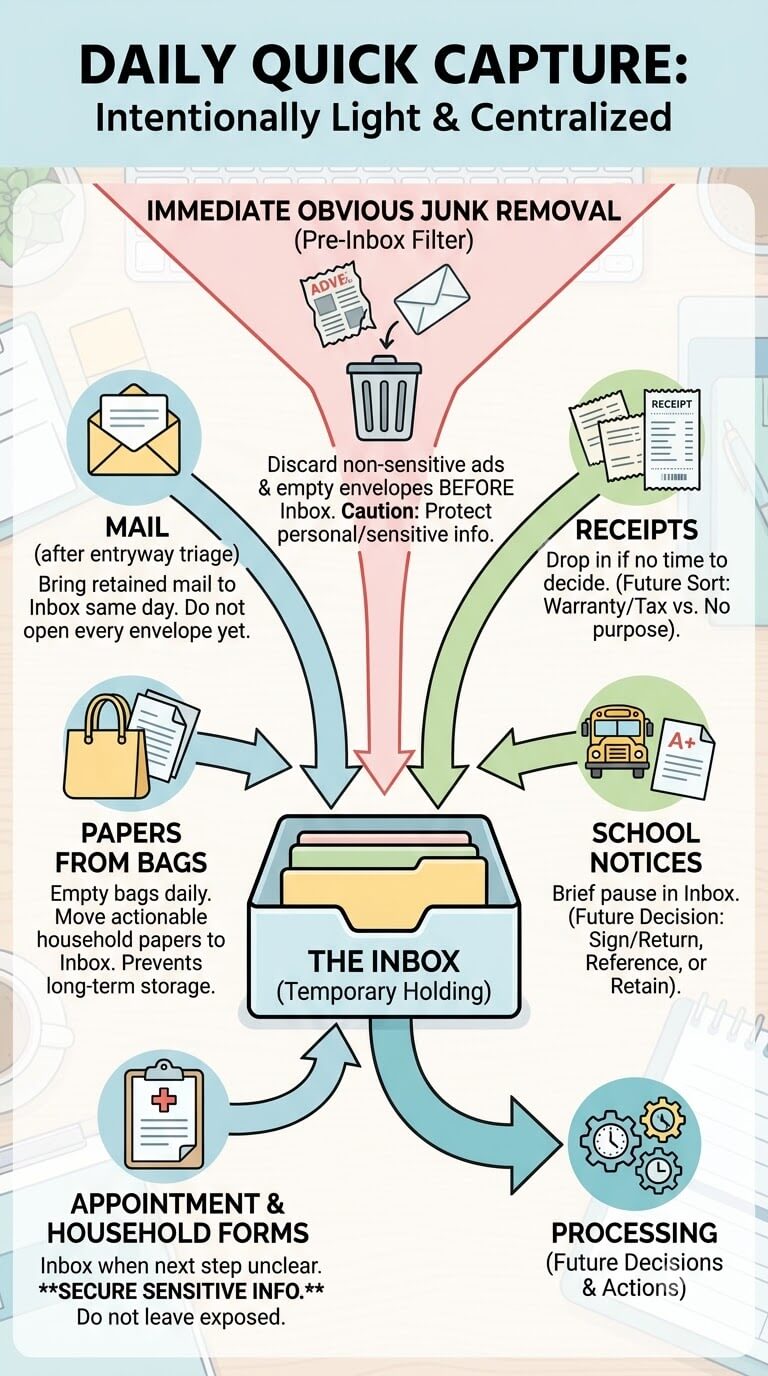
Daily capture should be intentionally light. The aim is to get relevant paper to one place, remove obvious nonessential material, and avoid making every weekday a full paperwork session.
Mail after entryway triage
Bring retained mail from the entryway to the inbox the same day it enters the home when practical. Do not open and fully process every envelope simply because it arrived.
Papers removed from bags
When work bags, backpacks, purses, or tote bags are emptied, move household papers that still need a decision into the inbox. This prevents bags from becoming long-term storage.
Receipts
Receipts can enter the inbox when you do not have time to decide whether they matter. During processing, separate receipts kept for a return, warranty, reimbursement, tax-related reason, medical purpose, or major purchase from those with no remaining purpose.
School notices
A school notice can pause in the inbox briefly, but it needs a child-specific decision during processing. A permission form may require a signature and return. A schedule may be short-term reference. A report card may belong with retained school records.
Appointment papers and household forms
Forms from medical visits, service appointments, insurance correspondence, property matters, and other household activities can enter the queue when their next step is not yet clear. If a document contains sensitive information, do not leave it exposed merely because the processing day has not arrived.
Immediate obvious junk removal
Remove obvious non-sensitive advertising inserts, empty envelopes you clearly do not need, and duplicate promotional material before they occupy the inbox. Be more cautious when a page contains personal information, account details, health information, or other sensitive content, especially if you are unsure whether it still has a purpose.
Choose a Realistic Weekly Processing Day
Consistency matters more than choosing a perfect weekday. Pick a time when you can finish the stack rather than repeatedly starting and abandoning it.
Match the household schedule
A Sunday afternoon may suit one family, while a quiet weekday evening works better for another. Look for a recurring window with enough time to make decisions, update the calendar, move papers to files, and prepare outgoing items.
Use a recurring routine rather than daily full processing
Most incoming paper does not require a full decision the minute it enters the house. A weekly session lets you group small choices while still maintaining a predictable rhythm.
Define a catch-up rule for missed weeks
Decide in advance what happens when the usual session is missed. A practical rule might be to process the inbox at the next available evening before adding another full week.
Weekly Processing Checklist
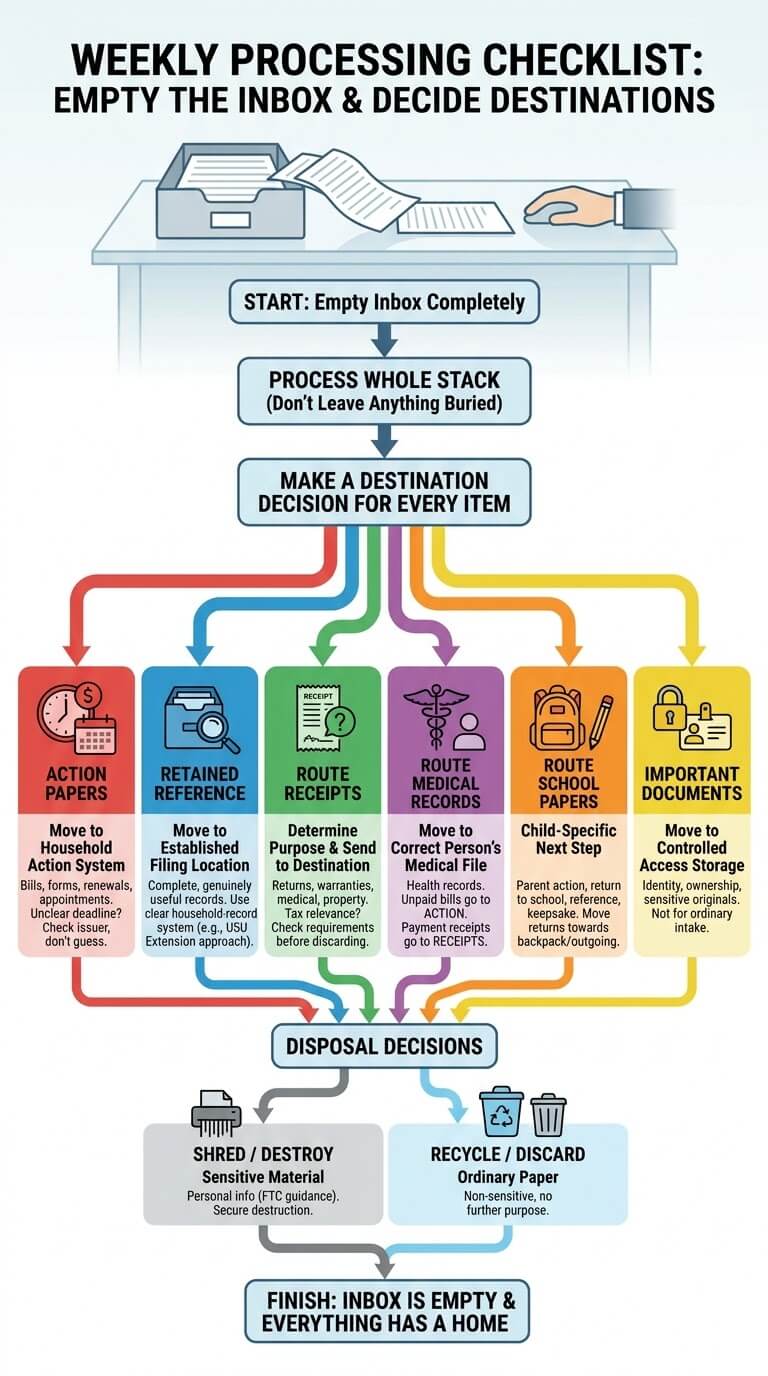
During the weekly session, work from one end of the stack to the other and make a destination decision for every item.
Empty the inbox
Take every paper out and place the stack on a clear surface. Starting with an empty container removes the temptation to leave difficult pages buried at the bottom. Process the whole stack before returning anything.
Identify action papers
Move bills, forms, renewal notices, returns, appointment papers, and other documents that require a response into the household action system. If a deadline or obligation is unclear, check the issuer or appropriate authority instead of guessing.
Move retained reference papers to filing
Records that are complete and genuinely useful for future reference should move to the established filing location. A clear household-record system, such as the organizational approach described by Utah State University Extension, can help keep retained information retrievable without turning every paper into a permanent file.
Route receipts
Ask why a receipt is being kept. If it supports a return, warranty, reimbursement, medical expense record, property record, or another valid purpose, send it to that destination. If tax relevance is possible, check current official requirements before discarding anything.
Route medical records
Medical papers that are health records should move to the correct person’s medical file. A medical bill that still needs payment or follow-up belongs with action papers instead. A payment receipt may follow the receipt process.
Route school papers
School-generated paper needs a child-specific next step: parent action, return to school, temporary reference, retained record, keepsake decision, or appropriate disposal. Move completed return items toward the backpack or outgoing location rather than back into the inbox.
Route important documents
Identity documents, ownership records, and other sensitive or difficult-to-replace originals should not remain in ordinary intake once identified. Move them to the storage location your household has chosen for controlled access.
Handle appropriate shred, recycle, or discard decisions
Disposal should depend on the paper’s purpose, sensitivity, and any requirements that apply to it. The FTC’s guidance on documents containing personal information is useful when deciding how to handle sensitive material. Do not treat ordinary recycling and sensitive-paper destruction as the same decision.
Calendar and Outgoing Handoffs
Some papers are useful only because they point to a date or must leave the home again. Processing should transfer the responsibility, not create another storage pile.
Add date-specific tasks to the household calendar
If a notice contains an appointment, school event, service date, renewal date, or response date, transfer the relevant information to the calendar system the household already checks. Keep the original paper only when it is still needed for the task, reference, proof, or another documented purpose.
Return completed forms to the correct bag or outgoing location
Once a school form is signed or a household document is ready to mail, place it where it will actually leave the house. That may be a child’s backpack, a work bag, a mail-out tray, or another established departure point.
Keep the paper with the task only when the task still needs it
Some actions require the original document, an account reference, an attached receipt, or supporting paperwork. Keep those pieces together until the task is finished.
Reset the Inbox
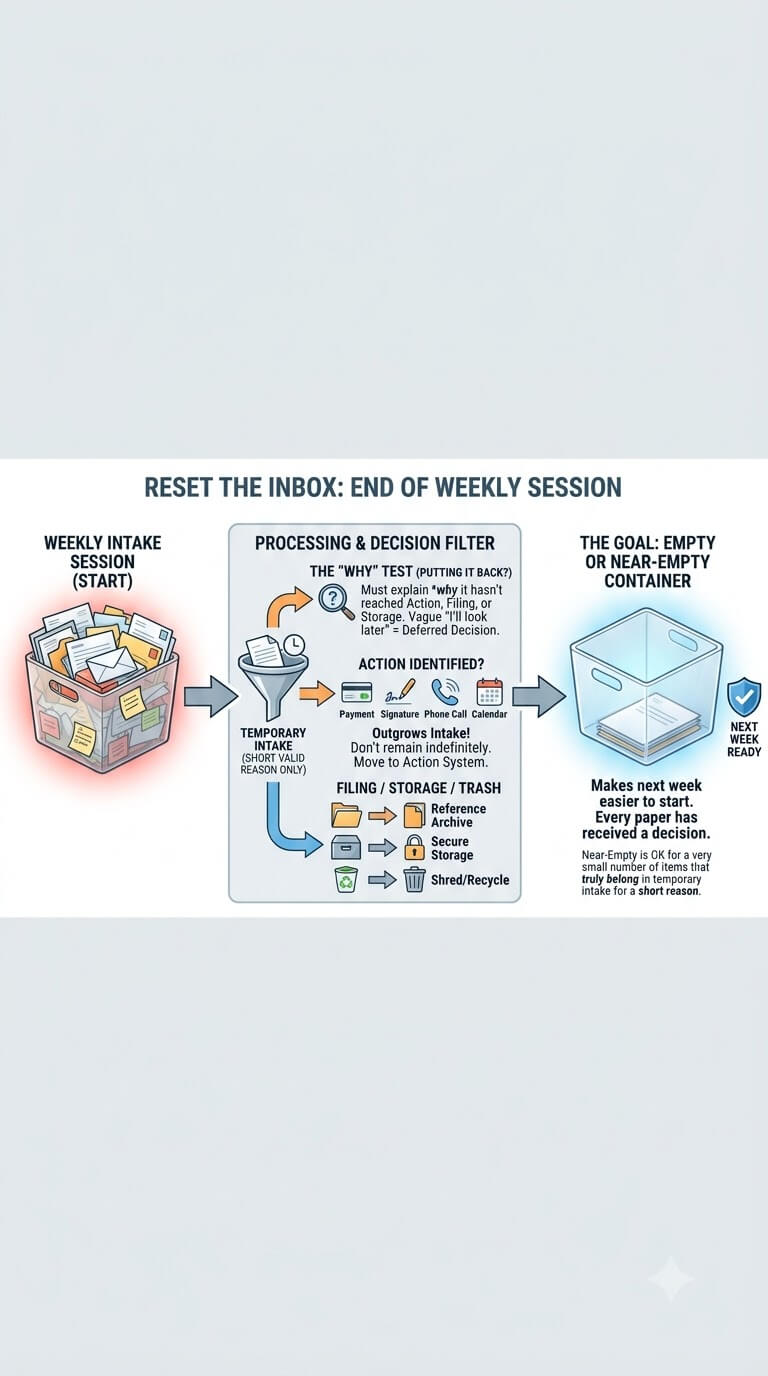
The end of the weekly session should be visible. A mostly clear container shows that the intake stage has done its job and makes the next week easier to start.
Aim for empty or near-empty
An empty inbox is a useful target because every paper has received a decision. Near-empty is acceptable when a very small number of items truly need to remain in temporary intake for a short reason.
Leave only items that truly belong in temporary intake
If you put something back, be able to explain why it has not yet reached action, filing, secure storage, or another destination. A vague “I’ll look at this later” is usually a sign that the decision was deferred rather than processed.
Do not let identified action papers remain indefinitely
Once a paper is known to require payment, a signature, a phone call, a return, an appointment, or another response, it has outgrown the intake stage. Keeping it in the inbox makes unfinished work look like unprocessed mail and raises the chance that newer paper will cover it.
Catch Up After Missed Weeks
A missed session does not require redesigning the system. The response depends on whether you have a slightly larger stack or a true multi-room backlog.
Separate a small routine backlog from a true household paper backlog
Two weeks of ordinary incoming paper can usually be processed with the same destinations you already use. Boxes, drawers, and piles from many months or years are different.
Triage urgent-looking action items without interpreting consequences
If the stack contains bills, notices, forms, or correspondence that appear time-sensitive, identify the legitimate sender and check the stated instructions. Do not guess about legal rights, financial consequences, coverage, school requirements, or medical meaning.
Process in groups without expanding the inbox permanently
When the stack is larger than normal, divide the work into short sessions if needed, but keep the original capacity limit. Do not solve one missed month by buying a bin that can hold six months.
Vacation and Busy-Season Paper Flow
Travel, holidays, illness, school transitions, and unusually busy work periods can interrupt a weekly routine. Plan a temporary exception without converting that exception into the new normal.
Use a temporary overflow limit
If you expect more paper than usual, define one temporary overflow folder or secondary tray and a date when it will be processed. Keep sensitive items controlled.
Resume normal processing after return
For trips where mail delivery itself needs management, review current options directly through USPS Hold Mail rather than relying on an improvised doorstep solution. After returning, process accumulated household paper in a deliberate session before resuming the usual weekly rhythm.
Know when accumulated paper needs a separate backlog reset
If paper has spread into bags, drawers, counters, boxes, and several rooms, the problem is no longer a slightly full inbox. First gather and sort the older backlog into broad destinations.
Signs the Inbox Is Becoming a Hiding Place
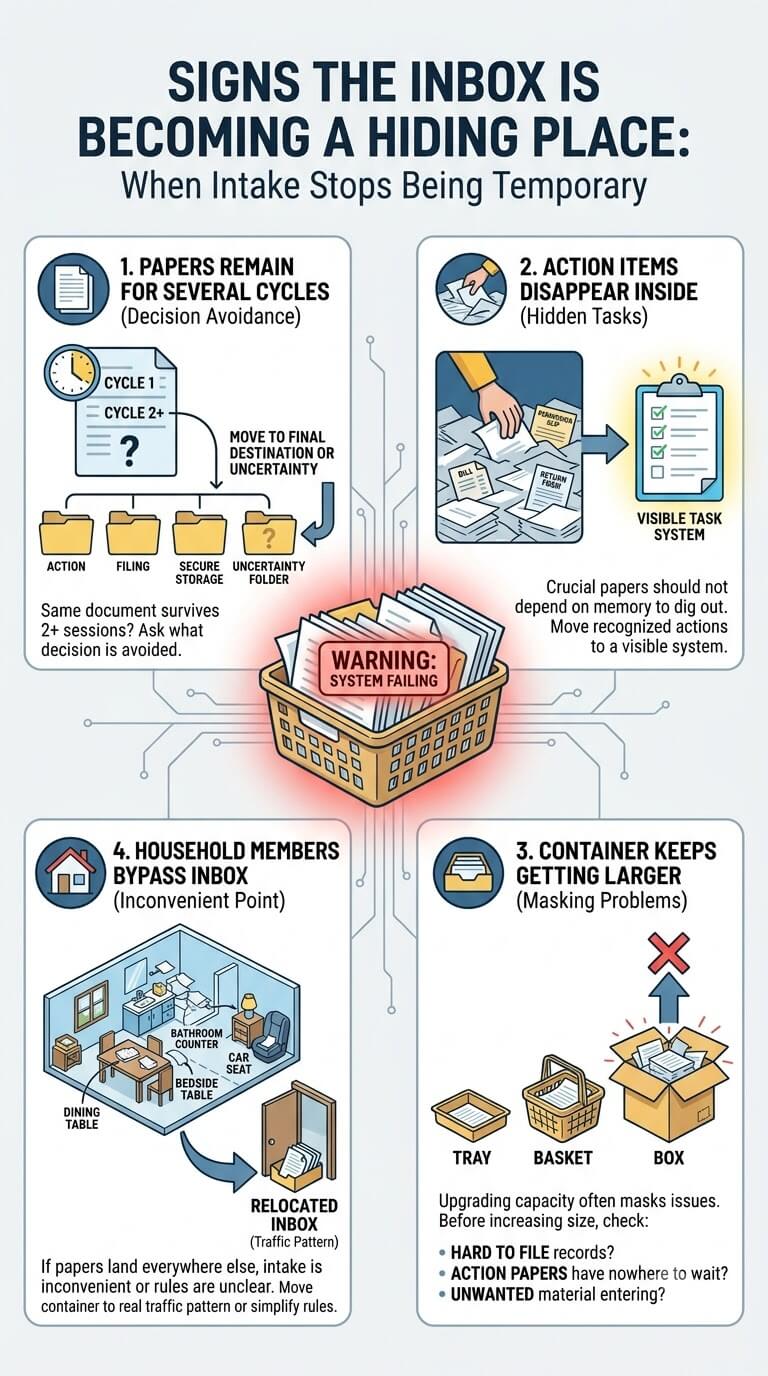
The system is failing when intake stops being temporary. These warning signs usually appear before the container becomes dramatically overfilled.
Papers remain for several cycles
If the same documents survive two or more processing sessions without a clear reason, ask what decision is being avoided. The paper may belong in action, filing, secure storage, or an uncertainty folder that requires checking an issuer.
Action items disappear inside intake
A bill, permission slip, return form, or appointment paper should not depend on someone remembering to dig through the inbox. Once the action is recognized, move it to a visible system for unfinished tasks.
The container keeps getting larger
Upgrading from a tray to a basket and then to a box may be masking missed processing sessions or difficult downstream systems. Before increasing capacity, check whether records are hard to file, action papers have nowhere to wait, or household members are adding material that should never enter the inbox.
Household members bypass the inbox
If paper still lands on the dining table, bathroom counter, bedside table, and car seat, the intake point may be inconvenient or the rule may be unclear. Move the container closer to the real traffic pattern or simplify who is responsible for transferring papers into it.
When the Inbox Is Not the Real Problem
Sometimes the intake routine is working correctly, but papers stall because the next destination is confusing. The best fix is to repair that destination rather than make the inbox more elaborate.
Filing is too complicated
If a household member cannot decide where a normal record belongs without consulting a long folder list, simplify the filing structure. Broad, understandable categories are easier to maintain than dozens of narrow labels.
Action papers have no visible workflow
If identified tasks keep returning to intake, create a small action area that distinguishes unfinished work from new paper. Keep due dates and necessary supporting documents visible in whatever simple format the household can maintain.
Receipts or school papers have no destination
If receipts and school papers dominate the inbox every week, give them clear next-step rules. Receipts need a purpose-based decision. School paper needs a child-specific route such as action, return, current reference, record, or keepsake.
Important documents lack secure storage
If sensitive originals stay in the inbox because nobody knows where to put them, establish a controlled storage location appropriate to the document and household. Avoid assuming an ordinary open filing drawer offers the protection every important original needs.
Common Paper-Inbox Mistakes
Most problems come from asking the inbox to do too many jobs. Keep its purpose narrow and the maintenance routine becomes easier to repeat.
Using it as permanent storage
A paper that has been fully identified should move on. Permanent records belong in filing or other appropriate storage. Important originals need controlled access. Action papers need a task workflow.
Creating one inbox per room
Multiple trays can look organized while hiding several independent queues. A bathroom basket, kitchen pile, bedroom drawer, and office tray require four processing habits.
Requiring full daily processing
A system that demands sorting, filing, calendar updates, shredding, and follow-up every evening may collapse during busy weeks. Daily capture can stay quick.
Keeping unlimited capacity
A large tote or deep drawer allows weeks of unprocessed paper to look contained. Containment is not the same as processing.
Duplicating the entryway mail station
The entryway needs only enough handling to stop mail from scattering and to remove obvious material. If the entrance develops sorting folders, permanent records, action trays, and an archive box, the front door has become a second paperwork system.
Special Situations That Need a Different Decision
The same core flow can handle many households, but a few situations need an extra boundary around privacy, ownership, or outgoing paper.
Mostly digital bills but physical forms still arrive
You still need a small physical intake point even if most statements arrive electronically. Insurance notices, school forms, medical paperwork, warranty material, property documents, and government correspondence may still appear on paper.
Multiple household members receive sensitive mail
Do not require everyone to place private correspondence in an open family basket. A controlled main intake area can include limited person-specific separation or a rule that sensitive envelopes go directly to the intended person.
No dedicated home office
A paper inbox does not require a desk or filing room. A slim vertical holder inside a cabinet, a shallow tray on a family command shelf, or a compact box in a discreet storage zone can work.
A missed month creates a larger backlog
Do not force a large accumulated stack through a tiny weekly routine in one sitting if it creates rushed disposal decisions. Pull out obvious action items first, then process the rest in manageable groups.
Paper that must leave the house again
Permission slips, return forms, mailed responses, reimbursement paperwork, and documents needed at appointments should have an outgoing destination once they are prepared. A paper that is ready to leave should not re-enter incoming storage.
FAQ About Paper Inbox Systems
These questions address the points that most often cause a simple intake routine to grow into another pile.
Should the paper inbox be at the front door?
Not necessarily. The front door can handle quick mail triage, but the main inbox should be where the household can safely collect and process paper.
How often should I process the inbox?
A weekly session works well as a household organization rhythm for many people, provided truly time-sensitive items are moved out sooner when recognized. This schedule is not a legal or financial retention rule and does not override deadlines stated by an issuer, school, provider, insurer, agency, or other authority.
What if I miss several weekly sessions?
Resume at the next realistic opportunity and process the accumulated stack by destination. If the problem has expanded into piles around the home, separate the older backlog from new intake.
Should bills stay in the inbox until paid?
No. Once you identify a bill as an unfinished task, move it to the action system so it stays visible with other items requiring attention.
What if the inbox keeps overflowing even when I process it weekly?
Look downstream. Filing may be too complicated, action papers may lack a visible home, school papers may not have clear child-specific routes, receipts may be kept without a purpose, or too much obvious junk may survive the first pass.
Final Thoughts
A useful paper inbox system is deliberately boring: one temporary queue, a realistic weekly processing session, and clear destinations for everything that leaves it. The strength of the routine comes from the handoffs.
If the system starts feeling complicated, return to the simplest question: is this paper still waiting to be identified, or does it already have a destination? The inbox is only for the first condition.

Ethan Carter is the Founder & Editor of HomeCleanSecrets. Based in the United States, he has 5 years of experience creating practical home cleaning, laundry care, stain removal, decluttering, and home organization content. His goal is to help everyday households clean smarter and build simple routines that are easier to maintain.
Read more about Ethan Carter on his author page: https://homecleansecrets.com/ethan-carter/