
Bills and action papers need a different home from finished records. If a document still requires payment, a signature, a phone call, a return, an appointment, a response, or a handoff to another person, keep it visible until that action is complete. Before a bill, form, or notice becomes an action paper, it may briefly pass through the household paper inbox until its next step is identified.

The simplest system is a small action zone with clear ownership, visible dates, and a weekly review. Once the task is finished, the paper should leave that zone and move to filing, a purpose-based receipt location, another household member, or appropriate disposal if there is no continuing reason to keep it.
Quick Answer: Keep Unfinished Paperwork Visible Until the Task Is Complete
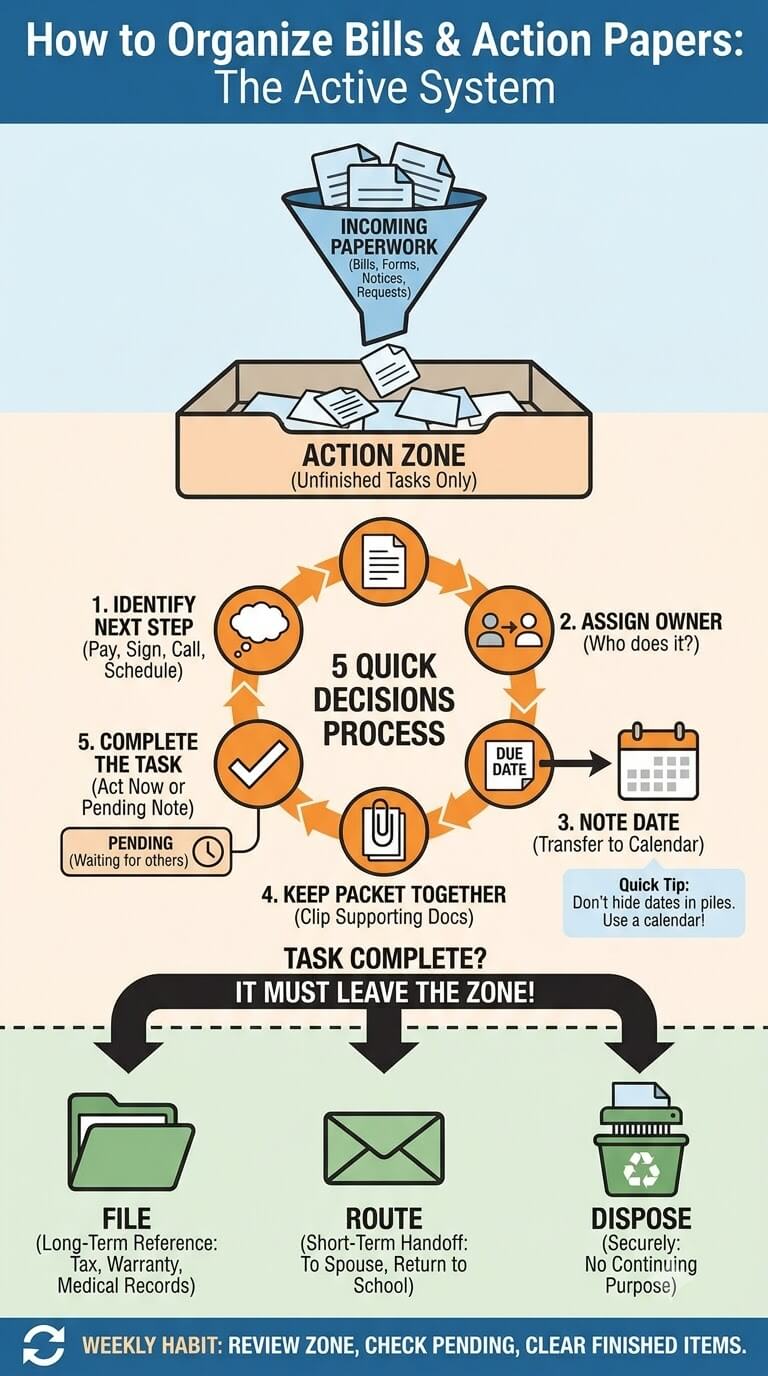
Identify, assign, date, act, then route the finished record
Give each action paper five quick decisions. First, identify what must happen. Second, decide who is responsible. Third, note any date that actually matters. Fourth, complete the task. Fifth, decide where the finished paper belongs.
A good test is to pick up any paper in the action zone and finish this sentence: “The next thing that needs to happen is…” If you cannot name the next step, the document may be reference material, an unclear notice that needs verification, or paper that does not belong in the active area.
Why unfinished papers should not disappear into long-term files
A folder labeled “Utilities” or “Insurance” may look organized, but it can hide work that is not finished. An unpaid statement, a renewal form, or a request for information should not be treated like a completed record merely because it relates to a familiar category.
Keep the action stage separate. Filing is the destination only after you have completed the required task and decided that the document still has a valid reference purpose.
What Counts as an Action Paper?
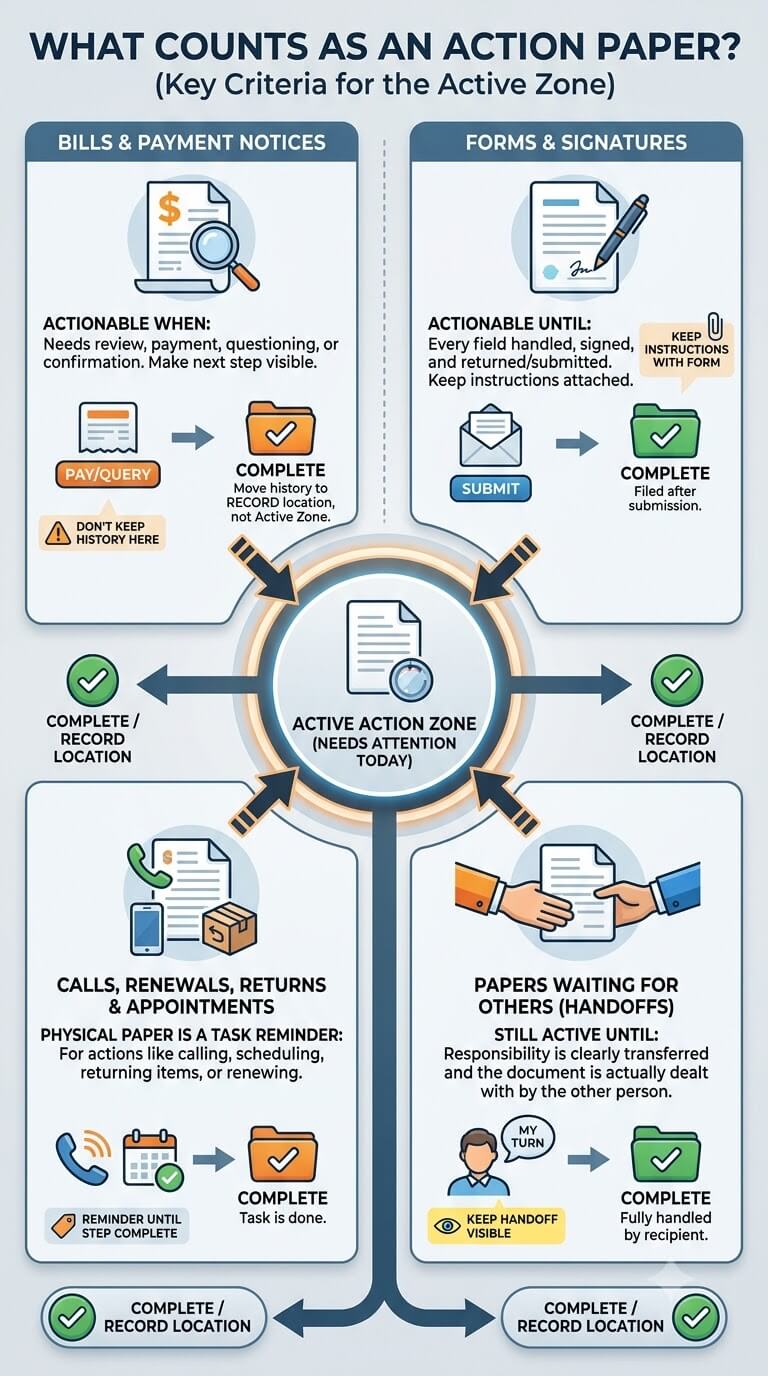
Bills and payment notices
A paper bill is an action paper when something still needs to be reviewed, paid, questioned, confirmed, or handled through the issuer’s normal process. The paper system should make the next step visible. It should not be used to decide when or how to make a financial choice.
If a bill appears incorrect, unfamiliar, or inconsistent with your records, do not mark it complete simply to clear the pile. Keep it in the action zone while you check the account and follow the issuer’s current instructions.
For recurring bills, avoid saving each new statement in the active zone after the household step is finished. The active area should show what still needs attention today, not provide a history of every prior month. If a completed statement has a continuing reason to be kept, move it to the appropriate record location instead.
Forms and signatures
Permission forms, renewal forms, consent forms, household service forms, and other documents requiring a signature should stay active until every required field is handled and the paper has been returned, submitted, or otherwise completed.
Keep any instructions that must travel with the form. A signed page separated from its return envelope or instruction sheet creates extra work later.
Calls, follow-ups, renewals, returns, reimbursements, and appointments
Some papers do not require writing on the page at all. A notice may tell you to call, schedule, return an item, request reimbursement, renew a service, or provide information through another channel. The physical paper still functions as a task reminder until that step is complete.
Papers waiting for another household member
A document does not stop being active when responsibility moves to someone else. If your partner needs to sign a form or your teenager needs to return a school paper, keep the handoff visible until the document is actually dealt with.
When a Paper Belongs in the Action Zone
Paper has a next action
Use the action zone whenever a paper asks for a concrete next step. Examples include paying, signing, calling, mailing, returning, comparing information, scheduling, or giving the paper to another person.
Do not put general reference material here merely because it feels important. Too much non-action paper makes the active items harder to see.
Paper has a due date or response window
If a document contains a date that affects when you must respond, the paper should remain visible and the date should be transferred to the household’s normal calendar or reminder method when appropriate. Do not rely on the paper pile itself to function as the only reminder.
Paper is waiting on someone else
Pending responses also belong in the active system. Keep a short note indicating what you are waiting for and from whom. This prevents the paper from looking finished simply because you have already completed your part.
Build One Simple Action Zone
Tray, folder, or small vertical file
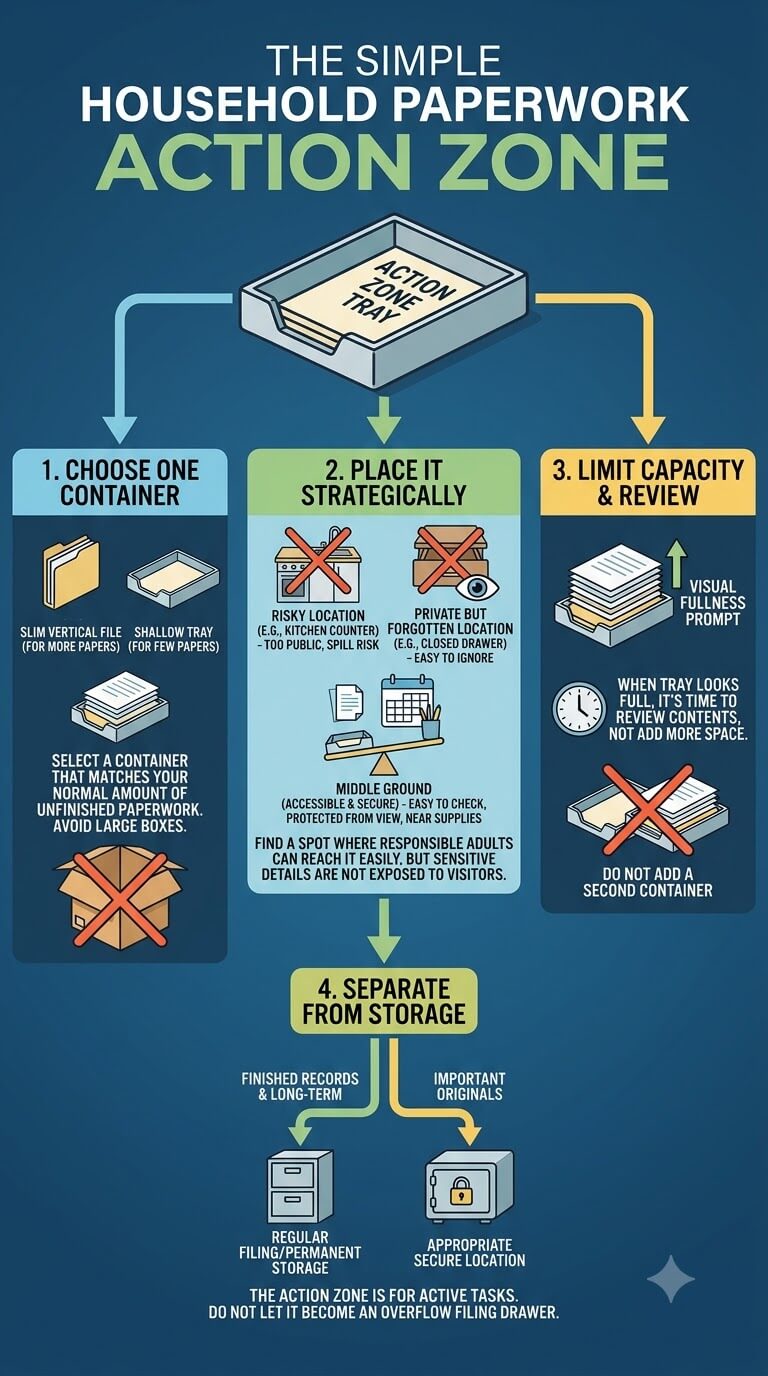
Choose one container that matches the amount of unfinished household paperwork you normally have. A shallow tray works for a few papers. A slim vertical file or a small set of folders can help when several people or task types are active at once.
Place it somewhere responsible adults can reach easily but where account details, health information, school information, and other sensitive material are not exposed to visitors or casual traffic.
A kitchen counter may be convenient but risky if papers are constantly moved for meals. A closed desk drawer may be private but too easy to forget. Look for a middle ground: easy enough to check during the week, protected from spills and casual viewing, and close to the calendar, envelopes, stamps, or other supplies you actually use for household paperwork.
Keep capacity limited
A large box makes it easy to postpone decisions. Choose a container that starts to look full before weeks of work can disappear inside it. When the action zone reaches capacity, treat that as a prompt to review the contents rather than adding a second container.
Separate action from permanent storage
Do not let the action tray become an overflow filing drawer. Finished records should leave. Long-term reference papers should move to their regular files. Important originals should go to the more appropriate secure location chosen for them.
Decide Whether You Need Today, Soon, and Later
Use time buckets only when they improve visibility
Some households work well with three simple sections such as Today, Soon, and Later. Others do better with one active folder plus a calendar. Use time buckets only if they make it easier to see what needs attention.
The labels are household planning aids, not interpretations of legal or contractual urgency.
Avoid creating many urgency categories
Categories such as “this week,” “next week,” “waiting,” “calls,” “sign,” “mail,” “online,” and “discuss” can quickly create a second filing system. If you spend more time deciding which active folder to use than doing the task, simplify.
Keep truly time-sensitive items easy to spot
A date-sensitive form can sit at the front of the action folder or in a clearly marked section. The paper should still be paired with a calendar reminder if missing the date would create a real problem. Check the document or issuer instructions rather than guessing what a deadline means.
Make Due Dates Visible Without Turning Paper Into a Calendar System
Mark or note the relevant date
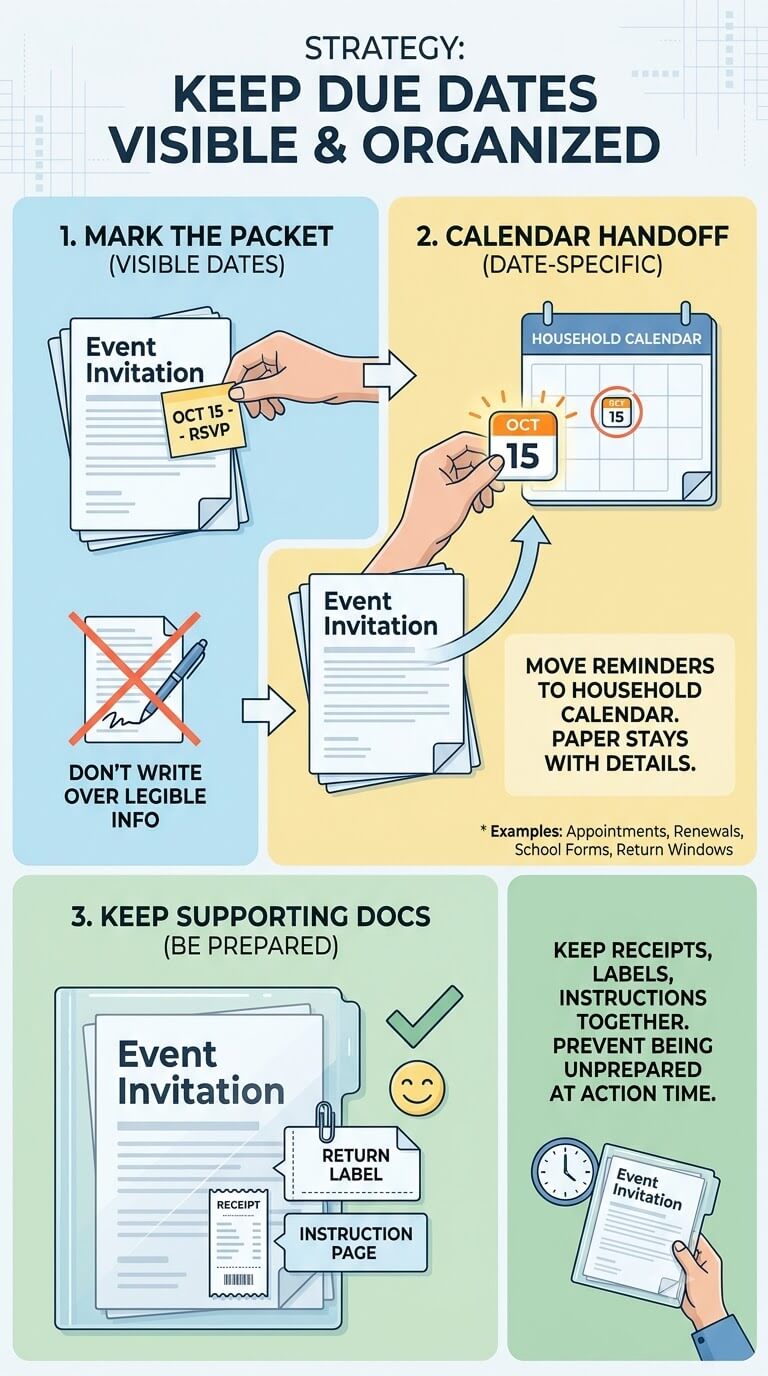
If the document clearly states a response date, write a small removable note or place the date on the front of the task packet so you do not need to reread several pages every time you review it. Avoid writing over information that must remain legible or be returned.
Calendar handoff for date-specific tasks
Move date-specific reminders into the same calendar your household already checks. The paper stays with the task details, while the calendar tells you when to look at it.
This is especially useful for appointment forms, renewal notices, school paperwork, return windows, and documents that must be mailed or delivered by a stated date.
Keep the paper with supporting documents when needed
If completing the task requires a receipt, confirmation letter, account notice, instruction page, or return label, keep those pieces together. A date reminder without the supporting paperwork can still leave you unprepared when it is time to act.
Keep Supporting Documents Together
Return receipts, forms, confirmations, and instructions
Store everything needed for one task as a single packet. A return might include the store receipt, return label, product paperwork, and a note about what must happen. A household service issue might include the notice plus a prior confirmation.
One task packet instead of multiple loose pages
Use a paper clip, small folder, or envelope when a task has several pages. Avoid staples when pages may need to be copied, scanned, separated, or returned individually. Write a short task label on the folder or removable note rather than across an original document.
Separate sensitive information from open display
Visibility does not require putting personal details in plain sight. If a task contains account numbers, health details, student information, identity information, or other sensitive material, keep the packet in a less exposed action folder and use a neutral reminder on the calendar.
Create a Pending-Response Folder
Papers waiting on an institution or person
Move a task into Pending only after you have completed the part that is actually yours. Examples include waiting for a corrected statement, waiting for another person’s signature, waiting for a reimbursement decision, or waiting for confirmation that a submitted form was received.
Note what response is expected
Add a simple removable note such as “waiting for confirmation” or “waiting for Alex signature.” If you were given a response timeframe, record it accurately. If no timeframe was given, do not invent one.
Review pending items without duplicating the entire task system
Pending should be one small section, not a second set of Today, Soon, and Later folders. During the weekly review, check whether the expected response arrived and whether the next step has changed.
Handle Shared Household Responsibilities
Assign an owner
For any paper involving more than one adult, name one person who is currently responsible for the next action. “We need to handle this” often leads to no one being sure who actually did it.
Ownership can change after each step. One person may make the call, then another may need to sign the resulting form.
Make handoffs visible
If a paper moves to another person, place it in an agreed handoff spot or give it directly to them and record the task where both people can see it. Avoid moving it to a bedroom, bag, or desk without telling the new owner.
Prevent two people from assuming the other handled it
During the weekly review, ask only one question about shared papers: who has the next move? If neither person can answer immediately, assign it before putting the paper back.
Process Common Action-Paper Types
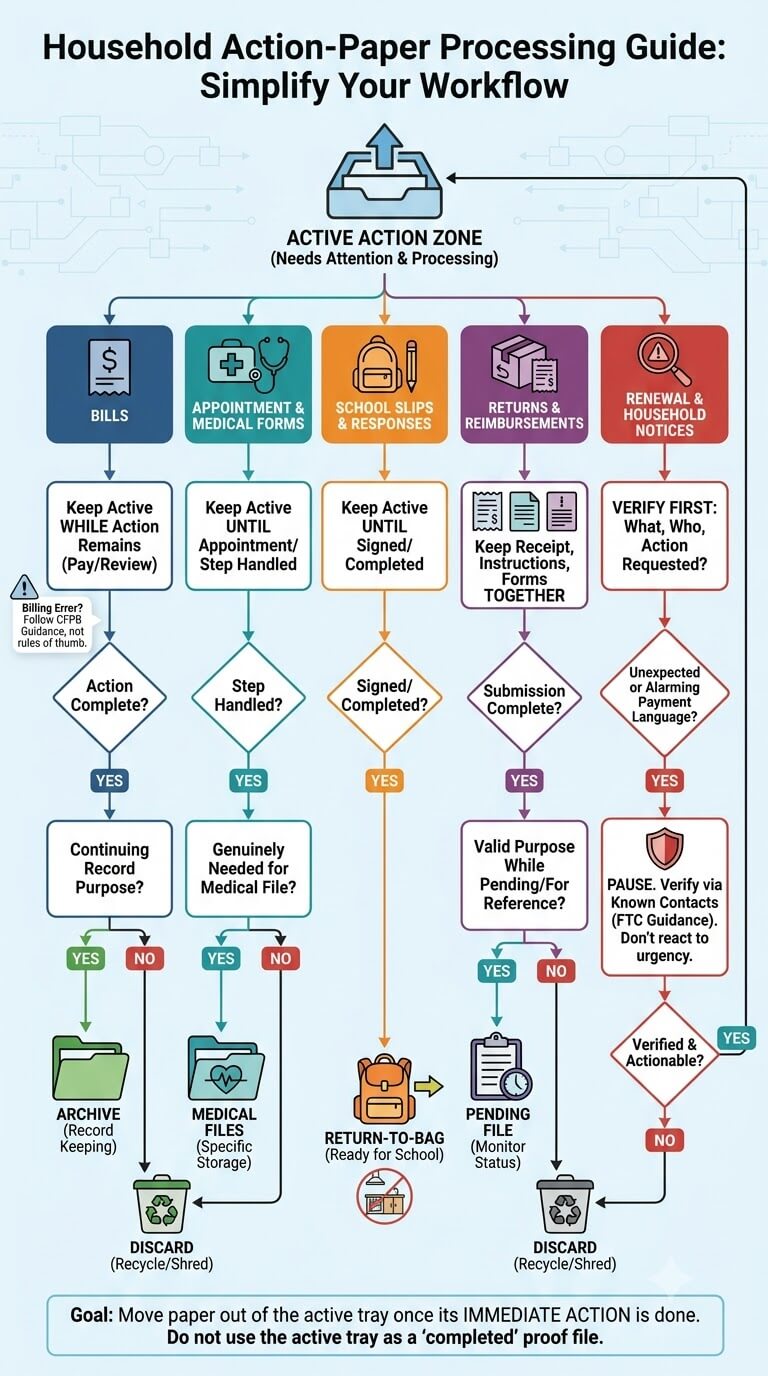
Keep bills active only while household action remains
Keep a paper bill active only while it needs household attention. Once the relevant action is complete, decide whether the finished statement has a continuing record purpose. Do not keep it in the active tray as proof that you completed the task.
If you find a possible credit card billing error, the Consumer Financial Protection Bureau’s billing-error guidance explains current steps for that specific situation. Follow the applicable instructions rather than relying on a household rule of thumb.
Appointment and medical forms
Appointment forms, referrals, questionnaires, and requests for information remain active until the appointment or requested step is handled. Afterward, move any health record you genuinely need into the person’s medical files rather than leaving it with general household tasks.
School permission slips and parent responses
School forms often have two movements: parent action, then return to school. Keep the paper active until it is signed or completed, then move it to the return-to-bag location so it does not remain on the kitchen counter.
Returns and reimbursements
Keep the receipt, return instructions, shipping or drop-off information, and any reimbursement form together. Once the return or submission is complete, keep only the paperwork that still has a valid purpose while the matter is pending or for later reference.
Renewal and household notices
A renewal or service notice needs verification before it becomes a task. Confirm what the document is, who sent it, and what action is actually requested. If a notice arrives unexpectedly or uses alarming payment language, pause before acting.
The Federal Trade Commission’s utility-scam guidance is a useful reminder to verify unexpected payment demands through contact information you know is legitimate rather than reacting only to urgency on a notice.
What Happens After the Action Is Complete?
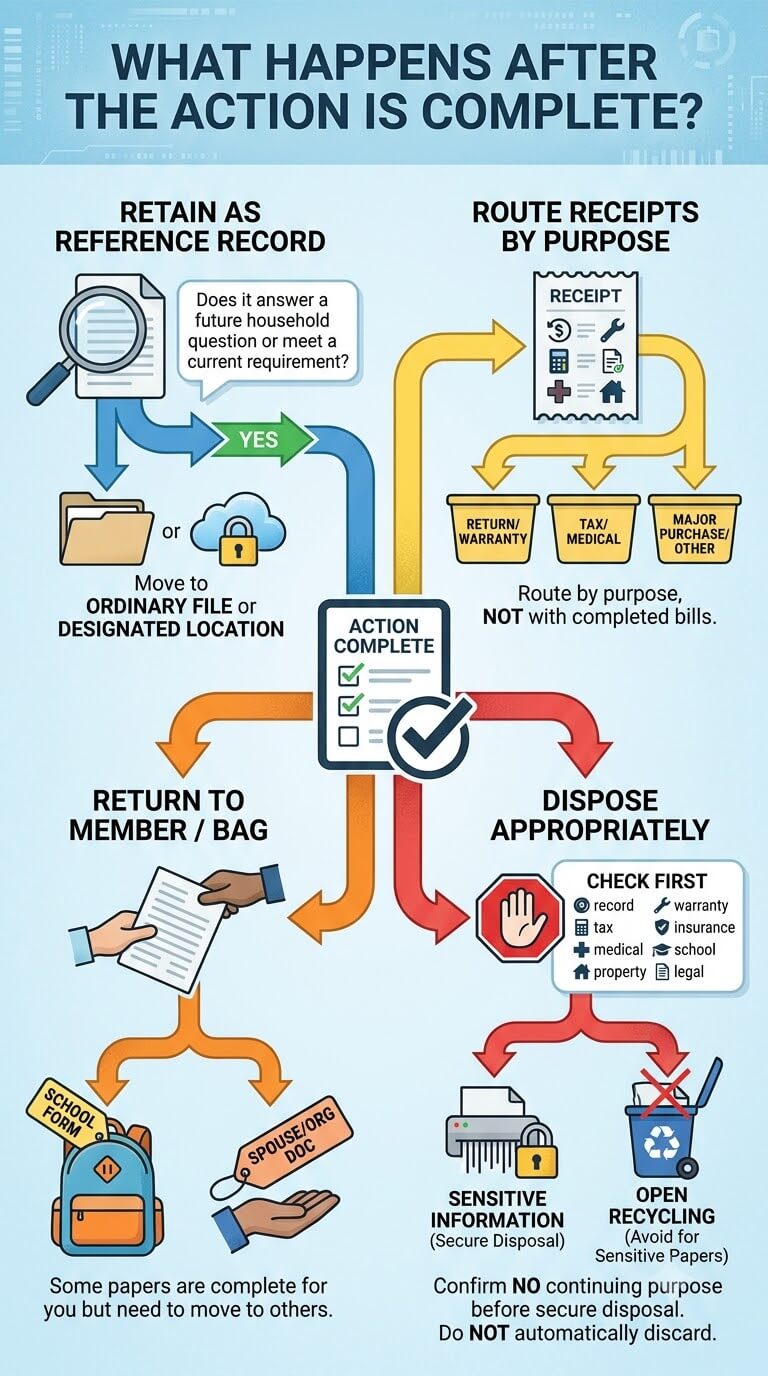
File retained reference records
When the task is finished, ask whether the document answers a future household question or meets a current requirement. If it does, move it to the appropriate ordinary file or other designated record location.
Route receipts by purpose
A receipt may still be needed for a return, warranty, reimbursement, tax-related matter, medical expense record, or major purchase. Route it according to that purpose rather than leaving it with completed bills.
Return documents to another household member or bag when needed
Some papers are complete for you but still need to move. A signed school form belongs in the child’s return-to-school flow. A document signed by one spouse may still need to go to the other person or to the organization that requested it.
Dispose appropriately after confirming no continuing purpose
Do not use “task complete” as an automatic disposal rule. First check whether the paper still has a record, warranty, tax, insurance, medical, school, property, legal, or other continuing purpose.
If it contains sensitive personal information and no longer needs to be retained, choose an appropriate disposal method for that document. Do not leave sensitive completed papers in an open recycling pile.
Weekly Action-Paper Review
Review open items
Once a week, take every active paper out far enough to confirm the next action and owner. You do not need to complete every task during the review. The purpose is to make sure nothing became invisible.
Check pending responses
Look at the Pending section and ask whether the expected reply arrived. If it did, move the paper back into the active area with its new next step. If it did not, follow the issuer’s or institution’s current process when a follow-up is appropriate.
Clear completed tasks
Remove finished papers from the active zone immediately. File, route, or dispose of them according to their continuing purpose. A good weekly review ends with fewer active papers, not a neater stack of completed ones.
Keep the action zone from becoming storage
If papers remain in the action area for several weeks, identify why. Some may be blocked, some may be reference material, and some may no longer require action at all. Reclassify them instead of allowing the container to become a holding bin.
When Action Papers Pile Up Faster Than You Can Complete Them
Identify blocked versus forgotten tasks
Separate tasks you can do now from tasks that cannot move because you are waiting for information, another person, an appointment, or a response. Forgotten tasks need action. Blocked tasks need a clear pending note and review point.
Reduce duplicate reminders
If you receive a paper bill, an email notice, an app alert, and a calendar reminder for the same task, decide which reminder you actually use. Keep the physical document only when it contains information or serves a purpose that the other reminder does not.
When the problem is bigger than paper organization
An organization system cannot resolve a disputed charge, determine a legal deadline, decide a tax issue, interpret a medical form, or tell you how an institution must respond. When the problem is substantive, contact the responsible organization or an appropriate qualified professional.
Common Action-Paper Mistakes
Filing unfinished bills
A bill that still needs attention should not disappear among completed statements. Keep it active until the required household step is finished, then decide whether it needs longer-term retention.
Hiding due dates inside folders
A folder can organize documents but it cannot reliably remind you that a date is approaching. Put date-specific tasks on the calendar or reminder method you already check.
Using one giant to-do pile
A tall pile hides older tasks and makes sensitive information easy to expose. Limit the size of the action zone and use only the minimum separation needed to identify next steps.
Keeping completed action papers in the active zone
Completed papers create visual noise and make the workload look larger than it is. Route them as soon as the task closes.
Mixing digital reminders with duplicate paper copies unnecessarily
If a task is fully managed through a secure account and the paper adds no useful information, you may not need the duplicate as an active reminder. Before discarding it, confirm whether the paper has any continuing purpose and handle sensitive information appropriately.
Edge Cases
Bills already handled digitally
If you receive a paper statement for an account you already manage electronically, decide whether the paper adds a real task. A duplicate statement does not need to enter the action zone merely because it arrived in the mail.
For households that want advance awareness of letter-size mail, USPS Informed Delivery can provide eligible users with preview images of incoming mail. A preview is not a substitute for processing the physical document after it arrives.
A form has both a record copy and a return copy
Separate the copies only after you understand which one must be returned. Keep the record copy with the task until submission is complete, then file it only if there is a continuing reason to retain it.
A deadline is unclear
Do not create a household deadline by guessing. Check the full document and current issuer instructions, then contact the responsible organization if the requirement is still unclear. Keep the paper visible while you verify what is required.
Several household members share responsibility
Choose one current owner and one agreed handoff point. If the next step changes people, update the owner immediately. Avoid making multiple copies simply so everyone has one unless there is a genuine need.
When several people need awareness but only one person needs the paper, share the task status rather than scattering copies around the house. One original packet plus a visible household reminder is usually easier to track than several identical sheets that can each look like the unfinished version.
FAQ About Bills and Action Papers
Should paid bills stay in the action folder?
No. Once the household action is complete, remove the bill from the active area. If there is a valid reason to retain the finished statement, move it to the appropriate record location. If there is no continuing purpose, confirm any applicable requirements before disposing of it.
What if I already receive a digital bill?
Use the paper only if it adds a task or information you genuinely need. If your secure online account already handles the task and the paper is merely a duplicate, it does not need to become an active reminder by default.
How do I organize papers waiting for someone else?
Keep them in a small Pending section with a note naming the expected response or current owner. Review that section weekly so “waiting” does not become permanent storage.
Should appointment papers live with medical records or action papers?
If an appointment paper still requires scheduling, completion, forms, or another step, keep it with action papers. After the appointment or task is complete, move any health information worth retaining into the appropriate person’s medical records.
What if I do not know whether a completed paper still needs to be kept?
Move it out of the active task area but place it in a short review folder rather than guessing. Check the issuer, agency, insurer, healthcare provider, school, warranty terms, tax guidance, or other authority relevant to that document before making a disposal decision.
Final Thoughts
An effective action-paper system keeps unfinished business visible without turning every bill, form, notice, and receipt into permanent clutter. Give active papers one small home, identify the next step and owner, move real dates to the calendar, and keep supporting pages together. This action stage works best within the overall household paperwork system, where completed paper moves onward instead of remaining in the task zone.
The most important habit is the finish line. After the task is complete, move the paper out of the action zone. File it only when it still has a useful record purpose, route it to the right household system when another step remains, and verify current requirements before discarding documents when retention is uncertain.

Ethan Carter is the Founder & Editor of HomeCleanSecrets. Based in the United States, he has 5 years of experience creating practical home cleaning, laundry care, stain removal, decluttering, and home organization content. His goal is to help everyday households clean smarter and build simple routines that are easier to maintain.
Read more about Ethan Carter on his author page: https://homecleansecrets.com/ethan-carter/