
A useful home filing system has one job: make retained household records easy to find. After a paperwork backlog is sorted and unfinished tasks are removed, build a small set of broad categories, clear labels, and a separate place for older archives.

The goal is retrieval, not perfection. A family should be able to find a vehicle record, insurance document, school record, or appliance warranty without remembering an elaborate color code or opening six nearly identical folders.
Quick Answer: Build the Filing System Around Retrieval, Not Around Every Possible Paper Type
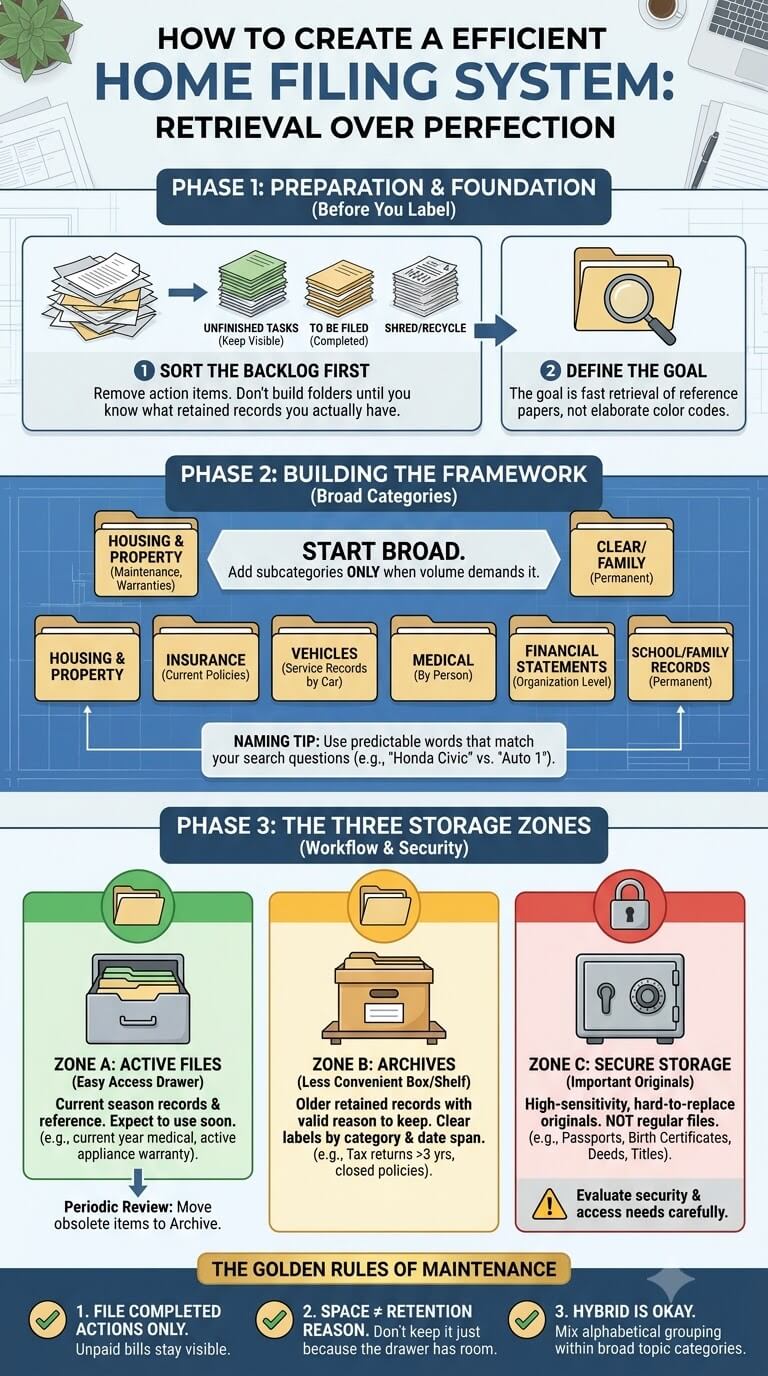
File only retained reference and record papers
Ordinary files are for papers you have already decided to retain because you expect to refer to them again. Examples may include current insurance paperwork, vehicle records, property documents that are appropriate for ordinary filing, warranty information, household service records, and selected family records.
A good test is to name the future question the paper would answer. “What is the model number for the dishwasher?” gives a reason to keep a warranty or manual. “What was the service date for this vehicle?” gives a reason to retain relevant maintenance records.
Keep unfinished action papers and sensitive important originals in their appropriate workflows
A bill waiting to be paid, a form that needs a signature, or a document that requires a phone call is unfinished business. Filing it with completed records can make the task disappear from view.
Sensitive or difficult-to-replace originals deserve a separate decision. Birth certificates, passports, titles, and similar records should not be pushed into an ordinary drawer simply because the drawer is labeled neatly. Consider access needs, sensitivity, and the protection offered by the actual storage product before choosing a location.
When to Build or Rebuild a Home Filing System
After a paperwork backlog has been sorted
Designing permanent folders is easier after you know what the household actually keeps. If you build the structure first, you are likely to create categories for papers you no longer need or overlook categories that repeatedly appear in your real records.
Utah State University Extension offers a Household Information Records Organizer built around gathering, organizing, and storing household records. You do not need to copy its categories, but it is useful to know what records you actually have before designing permanent folders.
Signs the existing system is too complex or overfilled
Rebuild when you regularly make new “temporary” folders because no existing label feels right, when several folders could plausibly hold the same document, or when household members ask you where everything goes. An overfilled drawer that cannot open smoothly is another practical warning.
Stop adding new categories when the problem is capacity rather than classification. Review whether older retained papers can move to an archive location, whether duplicates can be removed, and whether one broad folder would work better than several narrow ones.
What Belongs in a Filing System
Completed records and reference papers
The core filing zone should contain finished records and reference material that you expect to retrieve. Think of papers that document a completed event, explain a household product or service, record an account or policy at an organization-only level, or provide information you may need later.
What should stay in action, receipt, school, medical, or secure-storage workflows
Not every household paper should be forced into the general files. Unfinished bills and forms stay with active tasks. Receipts often remain temporary until a return, reimbursement, warranty, tax, or purchase-record reason justifies longer retention. Permanent filing is one destination within the full household paper workflow, after unfinished tasks and sensitive originals have already been separated.
Why filing is not a retention decision by itself
Putting a document into a folder does not establish that it should be kept indefinitely. Retention can depend on the purpose of the record, a tax rule, insurer requirement, warranty, property transaction, school need, healthcare context, legal matter, or other situation.
For tax-related papers, for example, the IRS recordkeeping guidance ties record retention to the underlying tax purpose and applicable period of limitations. That is a reason to separate organization decisions from legal or tax retention decisions.
Active Files Versus Archive Files

Define active by retrieval frequency and current use
An active file is one you expect to use in the current season of household life. Current insurance information, a vehicle service folder for a car you still own, current school records, or an appliance warranty that is still relevant may belong close at hand.
Move older retained records out of the active zone when appropriate
Older records that still have a valid reason to be kept can move to an archive box or less convenient drawer. This keeps the working files thin enough to use. Label archives so you can identify the category and time span without opening every container.
Review intervals are organization routines, not legal retention periods
A yearly archive review can be useful because it forces you to notice records that have become obsolete, categories that are growing too quickly, and papers whose required retention needs to be checked. The review date is only a housekeeping routine.
Household Filing Category Framework

Housing and property
This category may include ordinary records connected to the home, such as non-sensitive service documents, maintenance records, selected purchase information, and reference paperwork. Ownership documents or other high-consequence originals may require a different storage decision.
Utilities and household services
Use this area for retained records connected to electricity, water, internet, waste service, security service, pest service, or similar household providers when there is a continuing reason to keep the paper. Do not automatically file every monthly statement.
Insurance
Separate current policy information by useful household purpose, such as home, renters, auto, or another coverage type you actually carry. Closed policies can move out of the active drawer if they still need to be retained.
Financial statements at an organization-only level
If the household retains paper statements, organize them by institution or account purpose in a way that makes retrieval predictable. This is only a physical filing choice. It is not advice about which statements to keep, how long to retain them, or how to manage finances.
Vehicles
A vehicle folder can hold retained registration-related reference copies where appropriate, maintenance records, repair invoices, warranty paperwork, and other records tied to that vehicle. Use the vehicle name or another obvious identifier on the folder.
Warranties and manuals
File warranty records only for products you still own and for which the paperwork remains useful. Grouping by room can work when you think “kitchen appliance,” while grouping by product type works better for some households.
Family-member records
Person-specific folders are useful when a record is naturally retrieved by name. Avoid mixing every family member into one broad folder if doing so makes school, medical, employment, or personal records hard to locate.
Medical
General filing can include a clear location for health-related records, but the detailed structure should follow how the family uses those papers. Many households benefit from separating records by person and keeping current appointment or insurance action papers outside the finished files until resolved.
School
Long-term school records can live under the child’s name or a family education category. Current forms, permission slips, schedules, and papers that must return to school are not finished records and should stay in an active flow.
Receipts retained for a valid continuing purpose
A receipt belongs in filing only after you can state why it is still needed. A major purchase record, active warranty, reimbursement matter, tax-related reason, or property-related record may justify a longer home. Everyday receipts with no continuing purpose should not automatically receive permanent folders.
Important and Sensitive Documents Need a Different Decision
Ordinary files versus secure storage
A filing cabinet is designed for organization and retrieval, but that does not automatically make it appropriate for identity documents, legal originals, or other high-sensitivity records. Ask who can access the location, whether the container provides any manufacturer-rated protection, and how quickly the document must be reached.
Originals, copies, and high-consequence records
Label copies clearly and do not assume a scan or photocopy replaces an original for every purpose. For legal, identity, immigration, ownership, or agency-issued documents, check the responsible authority before deciding how copies should be used or whether the original can move.
Route rather than bury sensitive documents inside general folders
When a sensitive document appears, move it to the secure location chosen for important records rather than burying it in a general folder. For disposal, consider what information the paper contains. The FTC guidance on documents to keep or shred explains why personal and financial information changes that decision.
Choose Categories Before Subcategories
Start broad
Begin with the few categories that match repeated household retrieval needs. Housing, vehicles, insurance, family records, medical, school, and warranties may be enough to establish the first layer. You can always divide a category later if it becomes difficult to use.
Add a subcategory only when it improves retrieval
A subfolder earns its place when it makes a real document easier to find. “Vehicle: Honda Civic” may be more useful than one enormous Vehicles folder in a two-car household. Within that folder, separate “maintenance” and “warranty” only if the volume justifies it.
Recognize overcategorization
You probably have too many categories when you hesitate between two labels every time you file, when folders contain only one sheet for years, or when the household needs a written explanation of the logic. Merge categories until placement becomes obvious.
Folder Naming Framework

Use labels the household can predict
Name folders with words people naturally use when searching. “Car Insurance” is often clearer than an abstract label. The name should describe the retrieval question, not a clever filing concept.
Person-first versus topic-first naming
Choose the order that matches how you look. A family managing separate records for several people might use “Maya – Medical” and “Maya – School.” Another household might use “Medical – Maya” because all health folders sit together. Consistency matters more than the choice itself.
Avoid vague labels such as miscellaneous
“Miscellaneous” becomes a hiding place because almost anything can qualify. If several unrelated papers accumulate there, ask what future question each one answers. Create a real category only if multiple papers share that retrieval purpose.
Date labels only when date actually improves retrieval
Year labels are useful for records that naturally accumulate by period, but not every category needs annual folders. If you usually search by vehicle, property, child, or product, lead with that identifier.
Alphabetical, Category, or Hybrid Grouping
When alphabetical works
Alphabetical filing is straightforward when folder names are concrete and there are not many overlapping concepts. It can work well for provider names, family surnames, or a modest set of clearly labeled household topics.
When category grouping works
Category grouping keeps related records together, such as placing auto insurance, vehicle maintenance, and registration-related references inside a broader vehicle zone. This works well when household members think in areas of responsibility.
Hybrid layouts for mixed household records
A hybrid system is often the easiest. Use broad category dividers, then alphabetize or arrange folders predictably inside each category. For example, Medical can be grouped by person, while Warranties can be grouped by product.
Optional Visual Cues Without Overbuilding the System
Color coding as an optional aid
Color can help people spot a broad category quickly, especially in a crowded drawer, but it should remain optional. If blue folders are used for vehicles, the label should still say what the folder contains.
Why colors should not be required to understand the file
A filing system should work in black and white. If color is the only way to distinguish medical from school records, a missing label or color mismatch creates unnecessary confusion. Use words as the primary instruction and color as a secondary visual cue.
Simple tab placement and consistent labels
Choose one tab style and make labels readable without pulling folders out. Alternating tab positions can look tidy, but consistency is more valuable than decoration. If the drawer is deep, use dividers tall enough to remain visible.
Choose a Physical Filing Format

Filing cabinet or drawer
A cabinet or dedicated drawer works well for households with enough retained paper to justify a fixed location. Measure the usable interior and follow the furniture or file hardware instructions for load and operation.
File box or portable file
A lidded file box or portable file can be better for renters, small households, or categories that need to move between rooms. Choose a container designed for the file size you use and keep it within a manageable lifting weight.
Limited-space systems
In a small home, active records can fit in one portable file while archives live elsewhere. Another option is one shallow drawer with only current categories and a labeled archive container on a higher shelf. Keep sensitive documents out of publicly accessible areas even when space is tight.
Match capacity to retained records rather than creating unlimited storage
Choose enough space for the records you have a reason to keep, with modest room for normal growth. A huge empty cabinet can encourage “file it just in case” behavior. A container that is always bursting creates the opposite problem.
Shared Versus Individual Household Files
Family-wide categories
Shared housing records, utilities, household insurance, appliance information, and common service records usually make sense in family-wide sections. Keep the label focused on the household purpose so any responsible adult can retrieve the paper. Avoid keeping separate duplicate sets for each person unless there is a specific reason.
Person-specific records
Medical, school, employment-related, education, and certain personal records are often easier to retrieve under an individual name. Use the same naming convention for each person so adding a new household member or child does not require redesigning the whole drawer.
Access boundaries for sensitive information
Shared filing does not mean every file should be open to every visitor, child, roommate, or service worker who enters the home. Consider the sensitivity of identity, financial, health, and student information.
Current-Year and Archive Design
When year grouping helps
Year grouping is useful when a category generates a steady stream of records and people commonly retrieve them by period. It is less helpful for a warranty that lasts several years or a vehicle folder that follows ownership rather than calendar dates.
Archive boxes and labels
Archive labels should identify the broad category and, when useful, a date range or status such as “closed.” Keep the same retrieval logic used in active files instead of combining unrelated papers simply because they are old.
Keep an index when archives are not immediately visible
If archive boxes are stored in a closet, basement storage area, or another location away from the active files, keep a short paper index in the main filing area. List the archive label and location, not sensitive details.
Create a Simple File Index and Retrieval Test

What the index should list
A one-page index can list broad categories, major subcategories, and where archives or secure records are located at a general level. It does not need account numbers, health details, Social Security information, or other sensitive data. Its purpose is navigation, not duplication of private records.
Test common retrieval questions
Ask another household member to find three realistic items: the current auto insurance record, the washing machine warranty, and a child’s retained school record, for example. Do not coach them beyond the labels. If they find each item quickly, the structure is working.
Simplify any category that requires too much explanation
A category that only makes sense after a long explanation is fragile. Combine overlapping folders, rename abstract labels, or move the files into the category people naturally searched first. The best test is not whether the system looks orderly when finished.
Maintain the Filing System
File only after action is complete
Before filing a paper, ask whether anything still needs to happen. A bill still awaiting payment, an insurance form waiting for a response, or a school form that must be returned should stay in the active task area.
Periodic active-file review
Every few months, flip through the active drawer for obsolete duplicates, expired reference material, and records that clearly belong in archives. This is a maintenance interval, not a disposal rule.
Annual archive review as an organization checkpoint
An annual review is a practical time to confirm that archive labels still make sense, closed categories remain separated from current ones, and storage has not exceeded its planned capacity. Do not discard documents simply because the annual review date arrived.
What to do when one category keeps overflowing
First identify why the folder grows. It may contain unfinished tasks, duplicates, receipts with no defined purpose, older records that belong in archives, or a genuinely high-volume record type that needs its own subfolder. Solve the cause before expanding the cabinet.
Common Home Filing System Mistakes
Filing everything
Filing every piece of paper converts the cabinet into delayed clutter. Require a reason for retention and a predictable retrieval purpose. Temporary information, advertising, duplicate copies, and papers with completed short-term purposes should not automatically become permanent records.
Too many folders
Narrow folders feel precise while you are setting them up, but they make everyday filing slower. If you repeatedly create folders that hold one or two pages, merge them into a broader category. Add detail only after volume or retrieval difficulty proves that it is needed.
Mixing active tasks with records
An unfinished task should remain visible until it is complete. Filing a renewal notice, permission form, reimbursement request, or unpaid bill among finished records removes the visual reminder that action is still required. Keep the action stage separate from the record stage.
Treating ordinary files as secure storage
A neat drawer can still be easy for unauthorized people to access. Sensitive identity, financial, health, school, or legal information should be evaluated for privacy and access, not merely placed wherever the folder alphabet says it belongs. Match the location to the sensitivity of the document.
Keeping files indefinitely because the drawer has space
Available space is not a retention reason. During periodic reviews, identify why older categories still exist and verify official requirements when retention depends on tax, legal, insurance, school, healthcare, warranty, or property circumstances.
Edge Cases and Simplification
No dedicated home office
You can run a reliable system from one portable file, a closet shelf, or a small cabinet in a private area. Keep the active files accessible enough to use but away from places where sensitive information is exposed to guests or casual traffic.
Two adults with separate records
Create shared household categories for genuinely shared matters and person-specific categories for individual records. Do not duplicate everything in both places. Agree on the rule for papers that involve both people, such as shared insurance or property documents, so neither person creates a competing version of the system.
Multi-year household records
Separate current use from historical storage. Keep current records close at hand and archive older retained records with clear labels. When the correct retention period is uncertain, verify it before removing papers rather than using age alone.
A filing system inherited from someone else
Do not preserve unfamiliar labels simply because they are already printed. Test whether you can predict where current records belong. Keep necessary records, but rename categories in language the present household understands.
When a category should be split versus archived
Split a category when current records are hard to retrieve because several distinct purposes are mixed together. Archive when the category is logically clear but older retained material is consuming active space. If “Vehicles” contains two current cars, separate by vehicle.
FAQ About Home Filing Systems
How many filing categories should a household have?
There is no ideal number. Start with the smallest set that covers recurring retrieval needs without creating confusion. Many households can begin with broad areas such as housing, insurance, vehicles, warranties, family records, medical, and school, then add subcategories only when real volume or retrieval problems justify them.
Should I organize household files alphabetically or by category?
Choose the method that matches how you search. Alphabetical filing works when folder names are concrete and independent. Category grouping works when you naturally think “vehicle,” “medical,” or “home.” A hybrid often works best: broad category dividers with predictable folders inside each section.
Do I need separate current-year folders?
Only use current-year folders when the year helps retrieval. High-volume records may benefit from annual grouping, while warranties, vehicle records, or property files may make more sense by product or ownership period.
Where should important originals live?
Important originals should be evaluated separately from ordinary reference files. Consider sensitivity, replacement difficulty, access needs, and the actual manufacturer-rated protection of the storage product you use. For document-specific legal or issuing requirements, follow the responsible authority rather than assuming every original belongs in the same home location.
What should I do when one folder is always overstuffed?
Empty it and identify what is creating the volume. Remove unfinished action papers, duplicates, and papers with no defined continuing purpose. Move older retained records to archives when appropriate.
Final Thoughts
A home filing system works when ordinary retained records have a predictable location, unfinished tasks stay visible until completed, sensitive originals receive an appropriate storage decision, and older records can move out of the active zone without becoming lost.
Keep maintenance simple. File only papers with a continuing purpose, review active and archive areas periodically, and verify current official requirements whenever a retention or disposal decision depends on tax, legal, insurance, school, healthcare, warranty, or property circumstances.

Ethan Carter is the Founder & Editor of HomeCleanSecrets. Based in the United States, he has 5 years of experience creating practical home cleaning, laundry care, stain removal, decluttering, and home organization content. His goal is to help everyday households clean smarter and build simple routines that are easier to maintain.
Read more about Ethan Carter on his author page: https://homecleansecrets.com/ethan-carter/